Clínica del Sol wants the scheduling agent to answer the phone too. For the agent, a call is just another conversation: it receives text and returns text. What changes is everything around it: who answers the line, who transcribes what the patient says and who turns the answer into speech. This chapter explains the three ways to set it up and what the platform does in each.
Three paths
| Twilio | Telnyx (and similar) | Asterisk with Voice Edge | |
|---|---|---|---|
| Who answers the line | Twilio | Telnyx | Your Asterisk PBX |
| Who transcribes and speaks | Twilio | Telnyx | Voice Edge, with your speech providers |
| What the platform does | Receives text, returns text | Acts as Telnyx's language model | Receives the text Voice Edge passes on |
| Where it is configured | Twilio integration and the agent's Channels tab | Telnyx and an API key | Integrations → Asterisk |
| For whom | The most direct way | Anyone already using Telnyx, Vapi, Retell or similar | Own PBXs, calls that never leave the network |
In all three each call is a new session: the agent does not remember previous calls from the same number, except for what it stores in long-term memory (chapter 10).
Twilio
This is the complete path inside the platform.
- Install the Twilio integration with your account's Account SID and Auth Token.
- In Twilio, set your number's voice webhook to the agent's URL:
POST {API URL}/webhook/voice/{tenant}/{agent}. - When a call comes in, the platform checks Twilio's signature, tells it which voice and language to use and what greeting to say, and opens a real-time connection with Twilio.
- Twilio transcribes the patient. Each complete sentence reaches the agent as a message and the workflow runs.
- The answer comes back as text, as it is generated, and Twilio speaks it with the chosen voice.
The URL decides the agent. The platform does not assign numbers to agents: the agent that answers is the one in the webhook URL. Any active agent in the tenant answers if its URL is used.
The agent's voice settings
In the agent's Channels tab, the Voice card defines how it sounds:
| Field | Default | What it does |
|---|---|---|
| TTS Provider | Who generates the voice: Google, ElevenLabs or Amazon Polly | |
| TTS Voice | es-ES-Standard-A | The specific voice |
| Transcription Language | es-ES | The language Twilio listens in |
| Inactivity Timeout (ms) | 30,000 | How much silence is tolerated before hanging up |
| Inject Channel Prompt | Yes | Adds the platform's voice instructions |
The greeting is the agent's welcome text for that language (the same one the widget shows, chapter 11); if there is none, a generic greeting is used.
The voice instructions —short answers, no lists or links, numbers spelled out— are a platform prompt (chapter 10). They reach the model only if the card injects them and the answering step has voice instructions turned on. That step option is not in the step's form: the AI Builder turns it on when it builds an agent for voice (you can ask it to for an existing agent). A workflow designed for the widget, without that option, answers with lists and formatting that do not work when spoken.
Call data
If the call comes from a system of yours, you can add ?parameters= with a JSON to the webhook (up to 32 keys). The workflow receives them as call context, for example the patient number your PBX already identified.
Outbound calls
In the Twilio integration, Enable outbound calls from workflow nodes generates tools to start, fetch and update calls, restricted to the allowed origin numbers. That way a reminders workflow can call a patient.
Telnyx and similar voice platforms
Telnyx, Vapi, Retell, LiveKit or Bland answer the call, transcribe and speak on their own, and use the platform as their "language model": they call the agent's OpenAI-compatible endpoint with an API key with the channel:openai_compat permission (guide Calling an agent from your system).
- To make the whole call a single conversation, the platform uses the call identifier Telnyx sends (
call_control_id). Without it, each sentence would be a new conversation. - The metadata Telnyx sends reaches the agent as context.
- The Telnyx catalog integration separately adds call-control tools: hang up, transfer, play audio, gather digits.
For the platform, these calls are not voice calls but OpenAI-compatible channel calls: they do not receive the platform's voice instructions, so the spoken tone has to be in the agent's prompt.
Asterisk with Voice Edge
For clinics or companies with their own PBX. The audio does not go through a cloud telephony provider.
Voice Edge is a program installed in your network, next to Asterisk. Asterisk sends it the call audio; Voice Edge transcribes it with your speech provider, passes the text to the agent, and turns the answer into speech as it arrives.
The configuration is in Integrations → Asterisk, in two tabs:
- Asterisk connection: the PBX name, its SIP host and the allowed source addresses, the only ones Voice Edge accepts audio from.
- Voice Edges: each Voice Edge is a card with its extension and the agent that answers. Add Voice Edge creates it and generates a single-use installation key; on the machine in your network it is installed with
voice-edge enrolland that key. Opening the card sets the extension, the agent, the language, the speech providers, the greeting, concurrent calls, maximum times and whether interruptions are allowed.
Speech providers are chosen by level —the tenant's voice level to transcribe and tts to speak, with their backups (chapter 2)— or manually, with a fixed connection and model. Deepgram, ElevenLabs and Google (speaking only) are supported today.
Saving does not configure Asterisk. The screen shows the dialplan to load into the PBX, but the platform does not touch the PBX: whoever administers it does that.
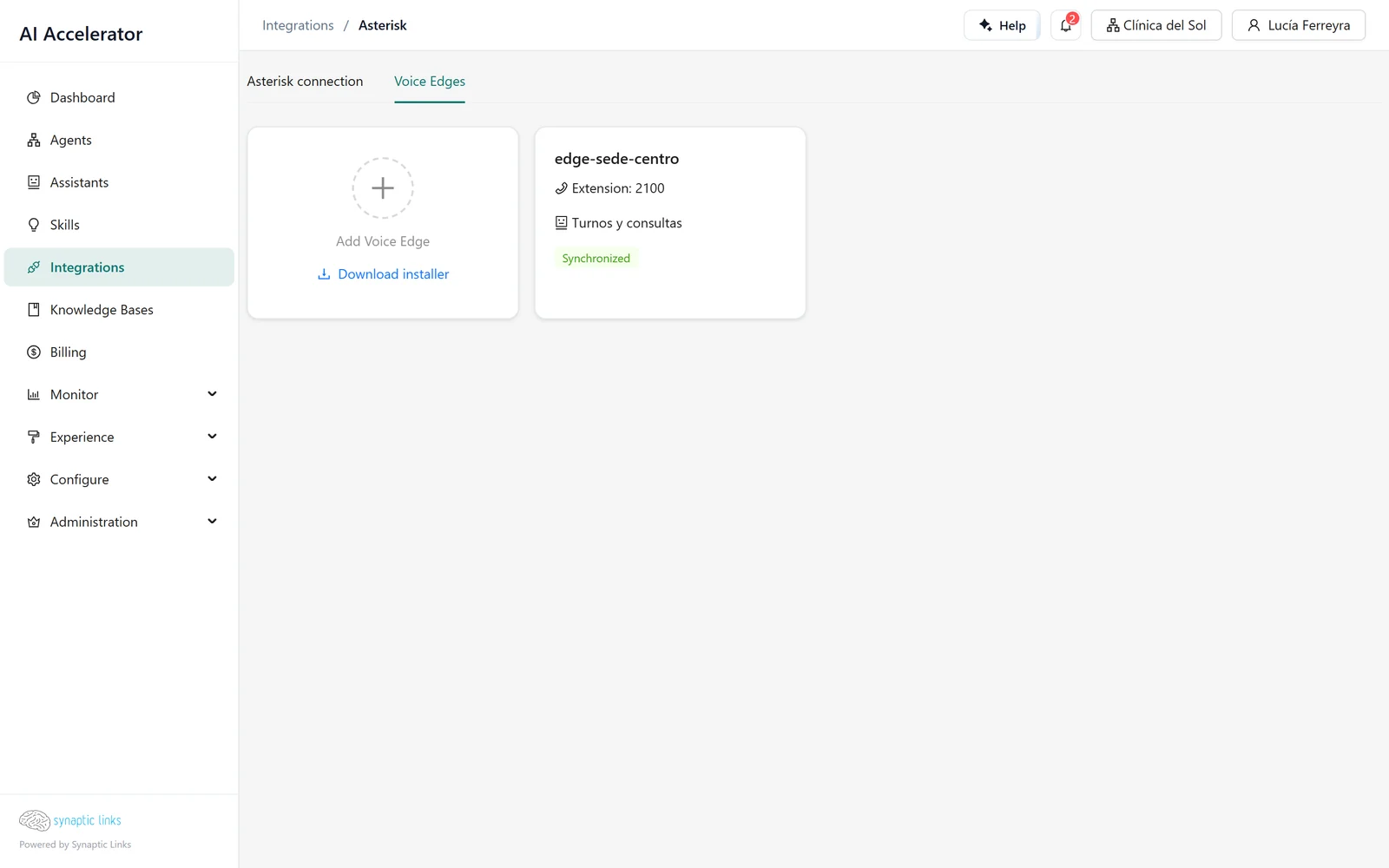
Voice Edge stays synchronised with the platform, and the card shows whether it has the current configuration. If it goes five minutes without syncing, it suspends itself until the connection is back. The key it uses to call the agent only works for the agent assigned to its extensions.
How a call unfolds
- One turn at a time. The patient's sentences are processed in order; if they speak while the agent is thinking, their sentence waits.
- Interruptions. If the patient speaks while the agent is answering, the audio stops, but the agent finishes thinking its answer.
- Keypad. Digits the patient dials arrive as text, for example "DTMF input: 2#". The workflow can use them like any answer.
- Errors. If something fails, the patient hears an apology in their language.
- Silence. After the inactivity timeout, the call is cut without a goodbye.
Ending the call
The Respond node has the option End the call after speaking. The platform waits for the text to be spoken and hangs up. In the scheduling agent, the branch that confirms the appointment ends with a Respond that says the confirmation and hangs up.
Transferring to a person or hanging up another call is done with the Twilio or Telnyx tools, not with a platform option.
What is stored
The conversation is stored like any session: the transcribed messages and the answers, in the history (chapter 7). Audio is not recorded.
Where it stops
- The agent does not remember previous calls: each call is a new session.
- With Twilio, the greeting and error messages follow the transcription language. With the "multi" language, they fall back to English.
- The
voiceandttslevels only apply to Asterisk; with Twilio, the voice is chosen on the agent's card. - Telnyx and similar do not receive the platform's voice instructions.
- If the tenant has a privacy policy configured (chapter 9), Twilio calls are rejected.
- There is no concurrent-call limit with Twilio; with Voice Edge, it is set per extension.
- The platform does not meter voice minutes: each provider bills transcription and speech to your account.
- Asterisk is not configured from the platform and Twilio numbers are not assigned to agents: both are done on the provider side.
- Silence ends the call without a goodbye.
To check
- Each Twilio number's webhook points to the right agent's URL.
- The answering step has voice instructions turned on (the AI Builder confirms it) and does not answer with lists or links.
- The agent's welcome text works when spoken aloud.
- The branches that close the conversation end with a Respond that ends the call.
- In Asterisk, the dialplan from the screen is loaded into the PBX and the Voice Edge card shows as synchronised.
- The outbound-call tools can only use the allowed origin numbers.