An agent for the clinic receives names, ID documents and health data, and it can book or cancel appointments. Anyone responsible for it will ask two questions before putting it in production: what stops someone from manipulating it, and what happens to the personal data people write to it. This chapter answers both, showing what the platform checks, at what moment and what it does when something fails a check.
Guardrails are nodes
Security controls are not a separate configuration: they are Guardrail nodes inside the workflow (chapter 3). That lets us decide exactly what is checked and where. A guardrail combines one or more checks:
| Check | What it checks |
|---|---|
| Prompt injection | Typical "ignore your instructions" phrases in the message |
| Jailbreak | Attempts to push the agent out of its role, evaluated by a model |
| Business scope | That the request is on the agent's topic; if not, it replies with an out-of-scope message |
| Moderation | Offensive or dangerous content |
| Personal data | Emails, phone numbers, cards, ID documents and names |
| URL filter | Links to domains that are not allowed |
| Custom rule | Regular expression, list of blocked or required terms, maximum length |
The simple assistant we saw in chapter 3 already comes with an input guardrail with prompt injection and jailbreak checks.
What is checked and when
Each guardrail has a subject: the text it looks at.
- Conversation. The incoming message, at the place in the graph where the node sits. It is the only subject that respects the node's position.
- Tool arguments and tool results. They apply to every tool call, across the whole agent, regardless of where the node sits.
- Model output and conversation history. They also apply to the whole agent.
A conversation guardrail can also check the output of specific earlier steps and replace it with its masked version before the next step sees it.
Tool guardrails can be limited to some tools with patterns (Agenda_Clinica__*). If they are not limited, they apply to all of them.
What happens when something fails a check
Each guardrail defines its reaction:
- Block (the default). The turn ends with the node's violation message, or with the out-of-scope message if it was the business scope check.
- Replace. The text is replaced by the violation message and the flow continues.
- Escalate. It is treated as a block, intended for handing off.
On a tool, a block rejects that call but the turn continues: the model receives the rejection and can answer without it.
Each guardrail can be set to Only record (audit): the check runs and records what it would have done, but changes nothing. It is the way to try a new guardrail in production without affecting users.
If the check itself fails
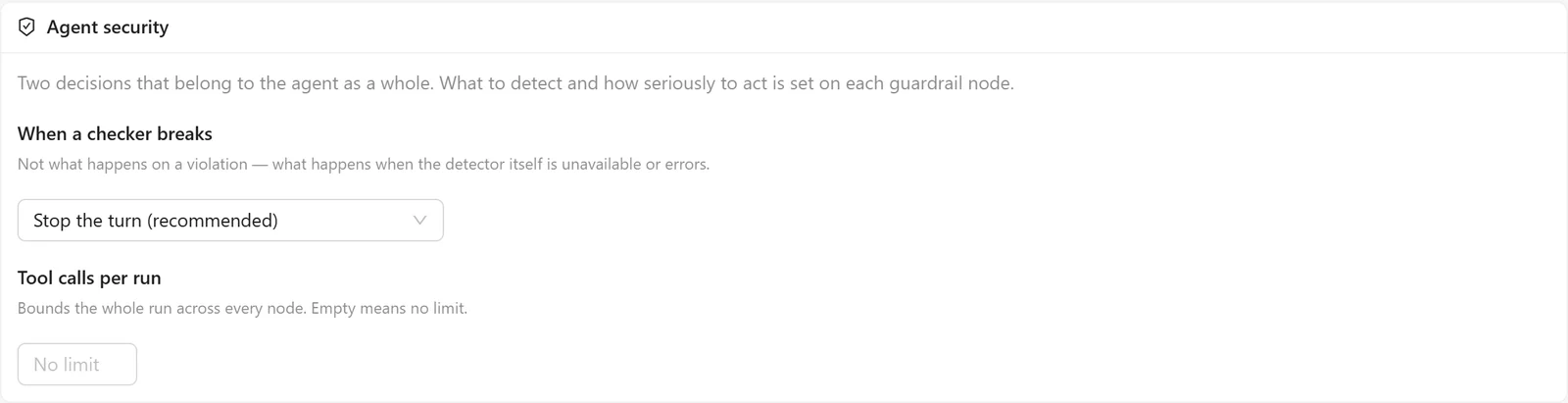
Some checks depend on a model or an external service. What happens if that service does not respond? That is defined in the Agent security section of the agent's detail, under When a checker breaks:
- Stop the turn (the default, and recommended). If a conversation check fails, the turn stops; if a tool check fails, the call is not made or its result is not delivered.
- Continue and record it. The content goes through and the platform records that the check could not run.
The jailbreak check needs a configured model. If the tenant does not have the model level it uses, the agent does not ignore it: it returns an explicit configuration error, and the widget shows that a model needs to be configured.
Personal data: three modes
The personal data check has three modes:
- Block. If personal data appears, it is treated as a violation.
- Redact. The value is replaced by
[redacted]and the flow continues. The model never sees it, and the user does not get it back in the answer either. - Tokenize. The value is replaced by a token, such as
[EMAIL_7f3a9c1b2d4e], which the model can use in its answer. Before showing the answer to the user, the platform restores the real value.
Tokenization is what lets the agent say "we sent the confirmation to ana@ejemplo.com" without the model provider ever having seen that email address.
For a specific tool to receive the real value (for example, the scheduling system needs the patient's ID document to book) it has to be enabled explicitly in the tool arguments guardrail. Only named tools, never all of them.
Detection: the built-in engine and Presidio
Detection can be done by the platform's built-in engine, with patterns, or by Presidio, a detection service connected from the integrations catalog (security category). The difference shows with a real message:
Hola, soy Ana Pérez. Mi mail es ana@ejemplo.com y mi DNI 30.123.456.
(In English: "Hi, I'm Ana Pérez. My email is ana@ejemplo.com and my DNI is 30.123.456.")
- Built-in engine, redact mode:
Hola, soy Ana Pérez. Mi mail es [redacted] y mi DNI 30.123.456.It finds the email, but not the DNI with dots or the name. - Presidio: detects the name, the email and the DNI. It recognizes ID documents from Argentina (DNI and CUIT), Spain and other countries, and it analyzes Spanish and English.
For a case involving health data, Presidio is the reasonable option.
The tenant's privacy policy
Above each agent's guardrails, a tenant can have a protected privacy policy, tied to its Presidio integration. When it exists, it changes the behavior of all of its agents:
- Everything that goes to a model is tokenized: messages, history, tool arguments and tool results. It does not depend on each workflow having its own guardrail.
- The user receives the real values only if the policy allows it, and other tools only if they are on the list of authorized destinations.
- The original values are stored encrypted, bound to the tenant and the session, for the retention days the policy defines (from 1 to 365). After that period they are destroyed, and a session with expired data can no longer be continued.
- What cannot guarantee that protection is rejected instead of running with exposed data: ingestion and search in knowledge bases, execution of code and skills, and voice, among others. The rejection is explicit.
It is a strong decision, intended for regulated customers. Before enabling it, it is worth reviewing which capabilities each agent in the tenant uses.
Where it stops
- The prompt injection check looks for known phrases; it is not a classifier. The sensitivity it shows does not change its behavior. For more elaborate attempts there is the jailbreak check.
- The built-in engine's moderation is a short English list. For real moderation, use the OpenAI provider or a compatible one over HTTP.
- The business scope check lets content through if its classifier does not return a usable answer, even when the agent is set to “Stop the turn”.
- The built-in engine does not detect names or ID documents with dots.
- The protected privacy policy has no screen in the admin: it is configured through the integration's API.
- With a protected policy there are no knowledge bases or voice for that tenant.
- Checking the model output in acting mode stops streaming for that agent, because text already sent cannot be corrected. In chat or voice agents, that guardrail goes in “Only record”.
To check
- Agents that receive personal data have a personal data guardrail with Presidio, not just the built-in engine.
- Tools that need real values are enabled by name, and no others.
- Each new guardrail spent some time in “Only record” first.
- Agents in production are set to “Stop the turn”, unless there is an explicit decision otherwise.
- The tenant has configured the model level that the jailbreak check uses.
- If a customer needs a protected policy, its agents do not depend on knowledge bases or voice.