The feedback in chapter 7 tells you what went wrong after a patient has already lived through it. Quality and alignment is the opposite: you write down in advance the questions the agent must get right, have it answer them and review what happened. It is how you check that a change of prompt, model or knowledge did not break what already worked.
This chapter explains the pieces, what happens when you launch an execution and how to read the results. To generate cases with AI help, see the guide Create tests with Quality and alignment builder.
The pieces
| Piece | What it is |
|---|---|
| Project | The folder of tests. It belongs to the tenant, not to an agent: the same project can run against different agents. |
| Case | One message or an ordered conversation (up to 50 turns), with its criteria and, optionally, a reference answer. It is a draft: every save keeps a new revision. |
| Test plan | A fixed list of exact case revisions (up to 200). Once published it never changes: editing a case later does not alter a published plan. |
| Execution | A plan run against an agent. Each case runs as many times as the repetitions you chose; each run is an attempt. |
| Evaluator | An instruction for the AI judge, versioned, with the model that applies it. |
Separating cases from plans is what makes two executions comparable: if you ran the same plan on Monday and on Thursday, you know the questions were exactly the same.
What happens when you launch an execution
From a published plan, Launch execution asks for the agent, the number of repetitions (1 to 10), the concurrency (1 or 2 attempts at a time) and a maximum time. Before launching you must tick that you authorize the calls to the agent and its tools.
That checkbox is not a formality. The execution uses the real agent, with its tools, its integrations and the tenant's credentials. If Clínica del Sol's scheduling agent can book in the calendar, a case that says "book me an appointment for Tuesday" will try to book it. A test tenant does not turn external connections into test systems: to test actions with side effects, the integration must point at the provider's test environment.
After launching:
- The platform checks that the agent is active and belongs to the same tenant, and records which version is active at that moment. You don't pick a version: the active one is always the one tested.
- It creates every attempt and queues them.
- The chat server picks them up gradually: at most 4 attempts at a time across the installation and 2 per tenant, on top of the concurrency you chose.
- Each attempt opens its own session, with its own memory identity, and sends the case's turns in order, as if it were a web widget user.
- When done, the execution is Completed if every attempt finished, or Completed with errors if any failed.
Some situations stop an attempt without failing it:
- Awaiting input. The agent asked for an approval, an answer from the user or an expired OAuth authorization. In the scheduling agent, a case that reaches the Confirm with the patient step stays there, because nobody is going to approve it.
- If the active version changes during the execution, the affected attempt fails: it is no longer testing the same thing.
- Interrupted · uncertain. It is not known whether the last step ran. It is not retried automatically: a person reviews it.
Cancel execution stops what is left but does not undo what already happened: a booked appointment stays booked.
The maximum time applies to the whole execution, not to each case. When it runs out, pending attempts are cancelled.
How a case passes or fails
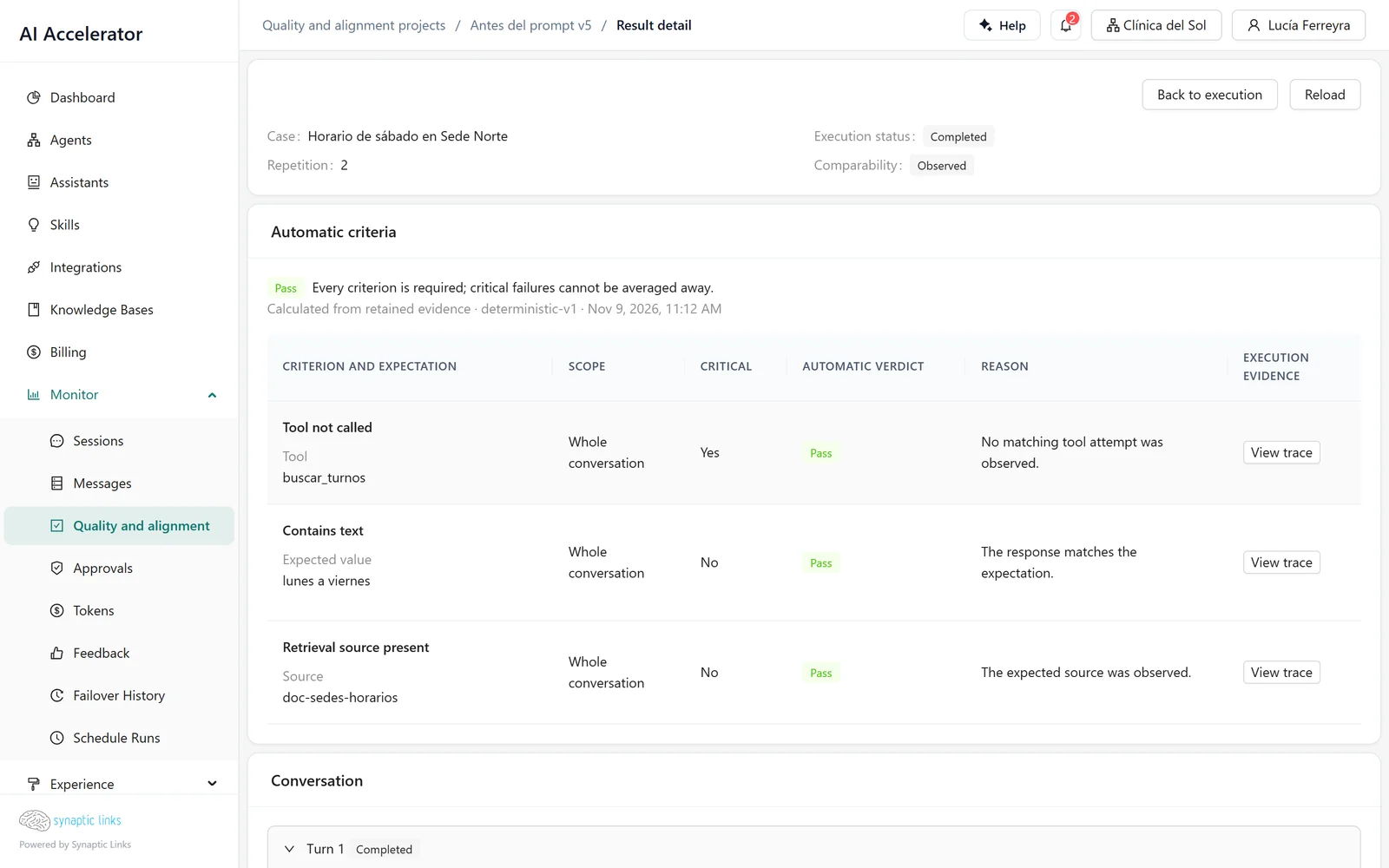
Each case has automatic criteria. They are evaluated on what was recorded during the execution —the answer, the tools called, the sources retrieved— not on a new call to the model:
| Criterion | Passes if… |
|---|---|
| Contains text / Does not contain text | The answer includes (or not) an exact, case-sensitive text |
| Exact text | The answer is exactly that text |
| JSON equals | The answer is a JSON identical to the expected one |
| Tool called / Tool not called | The agent called (or not) that tool |
| Tool argument equals | One argument of the call has the expected value |
| Retrieval source present | That knowledge source was among the retrieved ones |
Each criterion can apply to one turn or to the whole conversation, and can be marked critical. The case result follows a simple rule: if a criterion fails, the case is Fail; if none fails but one errored, the case is Evaluator error; if one could not be evaluated, or the case has no criteria, it is Not evaluable. A case without criteria is measured, but it never passes on its own.
For the clinic, the useful criteria are usually about tools: "on a question about opening hours, it does not call the calendar", "when asked for an appointment, it calls the calendar with the right location". Natural-language answers can rarely be compared with an exact text; that is what the AI judge is for.
The AI judge and human review
Rescore saved evidence asks a model to judge an attempt using an evaluator's instruction: for example, "the answer gives no medical advice and refers to the emergency room when urgent symptoms are mentioned". It does not run the agent again: it sends the model the messages, the saved answers and the reference answer.
- It returns the same kind of verdict (pass, fail, not evaluable, error) with a rationale and the cited evidence. There are no scores.
- It uses one of the tenant's own model connections. Today it works with OpenAI-type providers, and the tenant must be allowed to use its own keys.
- It is launched by hand, attempt by attempt, and consumes like any message.
- It does not change the automatic verdict: it sits next to it.
Human review works the same way: a person marks an attempt as approved, rejected or inconclusive, with a mandatory comment. It is added alongside, without replacing anything. Calibration compares the AI judge with human review so you know how far to trust the judge.
Comparing two executions
Compare experiments puts a baseline execution next to a candidate from the same project. For each side it shows completed attempts, verdicts, pass rate, critical criteria that failed, latency and cost. Below, criterion by criterion:
- Regression: it passed before and fails now.
- Improvement: it failed before and passes now.
- Evidence lost: it passed before and now could not be evaluated.
- Missing observation: the case is on one side and not the other.
At the top it says whether the comparison is compatible in observed conditions or exploratory, and why: the agent, the configuration, the plan or the version during the execution changed. An exploratory comparison is useful to look at, but a regression there may come from the changed conditions rather than from the agent.
The typical use: publish a plan, run an execution before changing the prompt, activate the new version, run another and compare.
Who can do what
- Any tenant role can view projects and results.
- Creating cases, publishing plans, reviewing and using the AI judge is for admins and owners.
- Launching or cancelling an execution also requires permission to edit the agent.
- Archiving a project or a case is owner-only.
Where it stops
- It does not gate activation. An execution with regressions does not stop you from activating a version; the decision is yours.
- It is not connected to feedback. A 👎 does not become a case automatically: someone has to write it.
- It always tests the active version. A pending version cannot be evaluated before it is activated; to test changes without affecting users, use a separate test agent with the same configuration.
- Agents with code nodes cannot be evaluated, and only the web channel is tested.
- There is no spending cap per execution and no scheduled executions: everything is launched by hand.
- Nothing is retried automatically and cancelling does not reverse effects.
- The AI judge only accepts OpenAI-type providers from the tenant's connections.
- The knowledge index version is not recorded: if you reindexed between two executions, the comparison does not know.
To check
- Integrations with side effects (calendar, payments, messages) point at a test environment before launching.
- Every case has at least one automatic criterion; natural-language ones have an evaluator.
- The criteria that must never break are marked critical.
- There is a baseline execution of the same plan before every important change.
- Before activating, the comparison is compatible and shows no critical regressions.