Nortelink builds similar agents for different clients: all of them answer questions, many draft replies, several generate documents. Building each piece from scratch for every client is slow and leaves every agent slightly different. The platform offers two ways to reuse work: skills, procedures an agent can invoke, and agent templates, complete agents ready to adapt. This chapter explains how each one works and where its limits are.
What a skill is
A skill is a packaged procedure: instructions, sometimes scripts, and a declaration of the tools it needs. Internally it is a skill-type agent, with its own versions, which other agents call when the task calls for it.
Compared with writing those instructions into the agent, the difference is twofold: the skill is maintained in a single place, and it runs with its own context instead of inflating the instructions of the agent that uses it.
The catalog
The Skills section opens on the catalog: procedures curated by the platform, most of them adapted from the public skill repositories of Anthropic and OpenAI, with their license and origin shown. They are grouped by category —documents, customer service, sales, marketing, productivity— and each card shows what it is for, when to use it and an example of input and output.
There are two profiles:
- Context only. They work with what the agent passes them: drafting a reply, preparing a meeting, summarizing. They do not connect to any system.
- With a connection. They need a tenant integration. PDF generation, for example, requires the document generation integration.
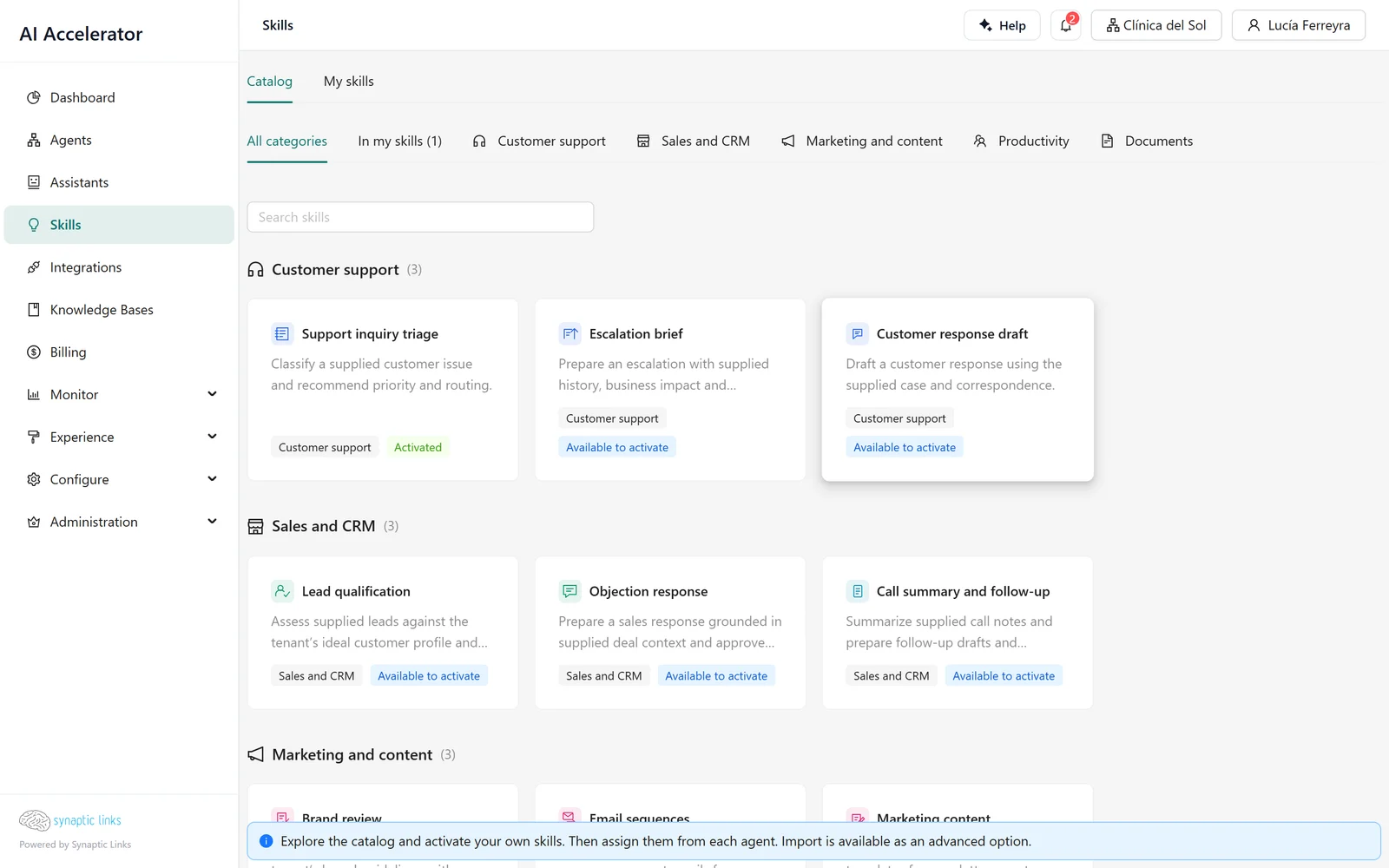
Activating: your own copy
Activating a catalog skill creates a copy in the tenant: a skill-type agent, active, with its name and description in the chosen language. From then on it is yours: you can rename it, review its workflow, export it or deactivate it.
On activation, the platform checks:
- That the tenant has skills enabled.
- That there is room within the agent limit: a skill counts as an agent.
- That the tools the skill needs exist: a single tenant connection has to expose all of them. If one is missing, or if two connections expose them, activation is rejected with a message stating the problem.
Activating the same skill twice does not create two copies: it returns the one that already exists.
Assigning: the agent decides when to use it
An active skill does nothing until it is assigned. In an assistant's configuration, or in a tool router in a workflow, the Skills field lets you choose them, up to 32 per agent. For each one you decide:
- When it activates. Automatically when the model considers it useful, only when the user chooses it, or both.
- How it runs.
- Delegated (default): the skill runs as a separate execution. It receives a self-contained task and the context the agent passes it, not the whole conversation, and returns its result.
- In this router: the skill's instructions and tools are loaded into the agent's own loop.
On save, the platform takes the permissions the skill declares and fixes them in the assignment. At runtime, the skill can only use those connections and operations, even if the agent calling it has more.
What happens when it runs
Back to the clinic. Nortelink activates Customer reply draft and assigns it to the reception assistant, in delegated mode.
- A patient complains about a charge. The assistant decides to use the skill and passes it a specific task: "draft a reply about the duplicate charge for the 3/11 appointment".
- The skill runs as a child execution, with the session's credentials and the assistant's tool budget, but without the chat history.
- It returns the draft, and the assistant uses it in its response.
Skills can call other skills up to three levels deep, never themselves and never in a cycle.
Packages: bringing your own skills
If the tenant has packages enabled, Skills → My skills lets you upload your own skill: a SKILL.md, or a ZIP with the SKILL.md at its root plus its files. The platform inspects and classifies it:
- Compatible: it can be saved.
- Requires configuration: something is missing in the tenant, such as a connection.
- Requires adaptation: it uses something that does not run here, such as scripts with network access or Node modules.
- Invalid.
An imported skill starts as a draft and cannot be assigned until it is published. Each version is identified by the exact content of its files, and it can be exported again as a ZIP.
Agent templates
A template is a complete agent with gaps to fill in. The gallery that appears when you click New workflow offers templates such as customer service, frequently asked questions, appointment scheduling, or support with Jira or GitHub.
Applying a template is a step-by-step wizard:
- Fill in the fields the template asks for: the business name, the tone, the opening hours.
- Choose the existing resources it needs: which knowledge base, which OpenAPI source, which MCP connection or which webhook to use. The template does not create resources; it uses the ones already in the tenant.
- Create. A new workflow agent is created, active, at version 1, and opens in the editor.
The difference from importing an artifact (chapter 3): an artifact is a concrete agent moved as-is from one tenant to another; a template is a model that is filled in on each use.
Where it stops
- Catalog updates do not reach activated copies. Reactivating returns the existing copy unchanged.
- If a published skill starts to need a new connection, existing assignments do not have it in their permissions and the agent stops using the skill until its configuration is saved again. A deactivated skill is skipped without warning in delegated mode.
- The name and description of a catalog skill stay in the language chosen when it was activated.
- Limits: three levels of nesting, 32 skills per agent, packages of up to 2 MB, scripts only in JavaScript and without network access.
- Templates belong to the platform: there are no tenant-specific templates.
- Applying a template does not check the agent limit, and if the chosen name matches an existing agent, it updates that agent instead of creating another one. Always choose a new name.
To check
- Activated skills count toward each client's agent limit.
- After publishing a new version of a skill with more permissions, the agents that use it were saved again.
- Skills that should run only at the user's request are set to manual activation.
- When applying a template, the agent name is new in the tenant.
- The resources a template asks for exist before applying it.