The previous chapters assume an installation that already exists. This one is for whoever installs the platform on their own infrastructure: an agency that wants its data in its own AWS account, or a company that cannot use a shared installation.
The first thing to know is that an own installation is configured almost entirely outside the admin: in a configuration file, in an AWS secret and in your identity provider. The system administration screens show the installation's state, but they almost never change it.
The installer
aiaccelerator is the command-line tool that installs and updates the platform's products: the full platform, the local runner, Voice Edge and the admin kit. It downloads each release from your vendor's admin, verifies the package signature and the integrity of every file, and only then runs that product's installer.
For the full platform you need:
- A machine with Node 22, AWS CLI v2 and Docker running: the images go through that machine.
- An AWS account with administrator permissions, a domain and two issued certificates in AWS: one for the domain, in us-east-1, and one for
runtime.<domain>, in the installation's region. - An OIDC client in your identity provider, with the redirect
https://<domain>/admin/auth/callback. - From your platform vendor: the licence details, the address of their admin and authorization to download the images.
The first installation is guided: it generates the keys, builds the configuration, checks the requirements, prepares the account, shows the changes and deploys. Deployment takes 30 to 60 minutes. At the end it lists the two DNS records to create.
What lives outside the admin
| Where | What it holds |
|---|---|
customer.json | Region, domain, network and database (create or use existing), identity provider, basic or resilient profile, server size and environment variables |
| The application secret in AWS | Four internal keys you generate and the three licence values |
| Your identity provider | Who can sign in to the admin |
customer.json.installed.json | The installed version and what upgrades need |
customer.json rejects variables whose name looks like a secret —SECRET, TOKEN, PASSWORD, API_KEY—: secrets go in the AWS secret.
Keep customer.json.installed.json. Without that file the installer cannot upgrade: it treats the installation as a new one.
The first administrator
The first person to sign in to a new installation becomes an owner with access to everything. Before publishing the admin's address, sign in yourself.
Upgrading and rolling back
aiaccelerator update platform installs a new version if the installed version is among the ones the new release accepts as a starting point, and if neither the infrastructure foundation nor the vector store image changed. It first asks you to confirm there is a backup.
During the upgrade the platform enters maintenance: it stops taking requests, updates the database, applies migrations and deploys the services. If something is interrupted, it stays in maintenance on purpose, so it never serves a half-migrated database; the installer has a command to resume.
Rolling back is only possible to a version the installed one declares compatible, with the same database version. Database migrations are not reversed.
The platform is not uninstalled with the installer: removal is a manual procedure, so nobody deletes an installation by mistake.
The licence
The licence is a token signed by the vendor. The platform validates it without contacting anyone: signature, issuer and expiry.
- What it enables. It caps the features of every tenant: voice, WhatsApp, Slack, custom branding, API access, the workflow editor, plans, billing and the rest (chapter 8). A tenant cannot have a feature the licence does not include.
- Renewal. Once a day, the platform asks the vendor for the current licence. It needs outbound internet access to the vendor; if that fails, it keeps the one it has.
- Grace period. If the licence allows it, there are a few days of grace after expiry during which the platform keeps working.
- On expiry. The servers stop. Without a valid licence they do not start, and if it expires while running, they shut down when the grace ends. For users, the widget and the admin stop responding.
The licence is not entered in the admin: it lives in the AWS secret, and the services read it at startup. Changing it means updating that secret.
Today, the daily renewal is not enough. Because of a known defect, when the licence stored in the secret expires, the servers behave as if it had expired even if the renewal brought a new one. Until it is fixed, update the secret with the current licence before each expiry.
What the admin shows
Under Administration, for the super admin only:
- Platform: the installation's state, with its services, versions, profile and components. It is read-only.
- License: licensee, plan, features, issue and expiry dates, and days left. It warns when 30 days or fewer remain.
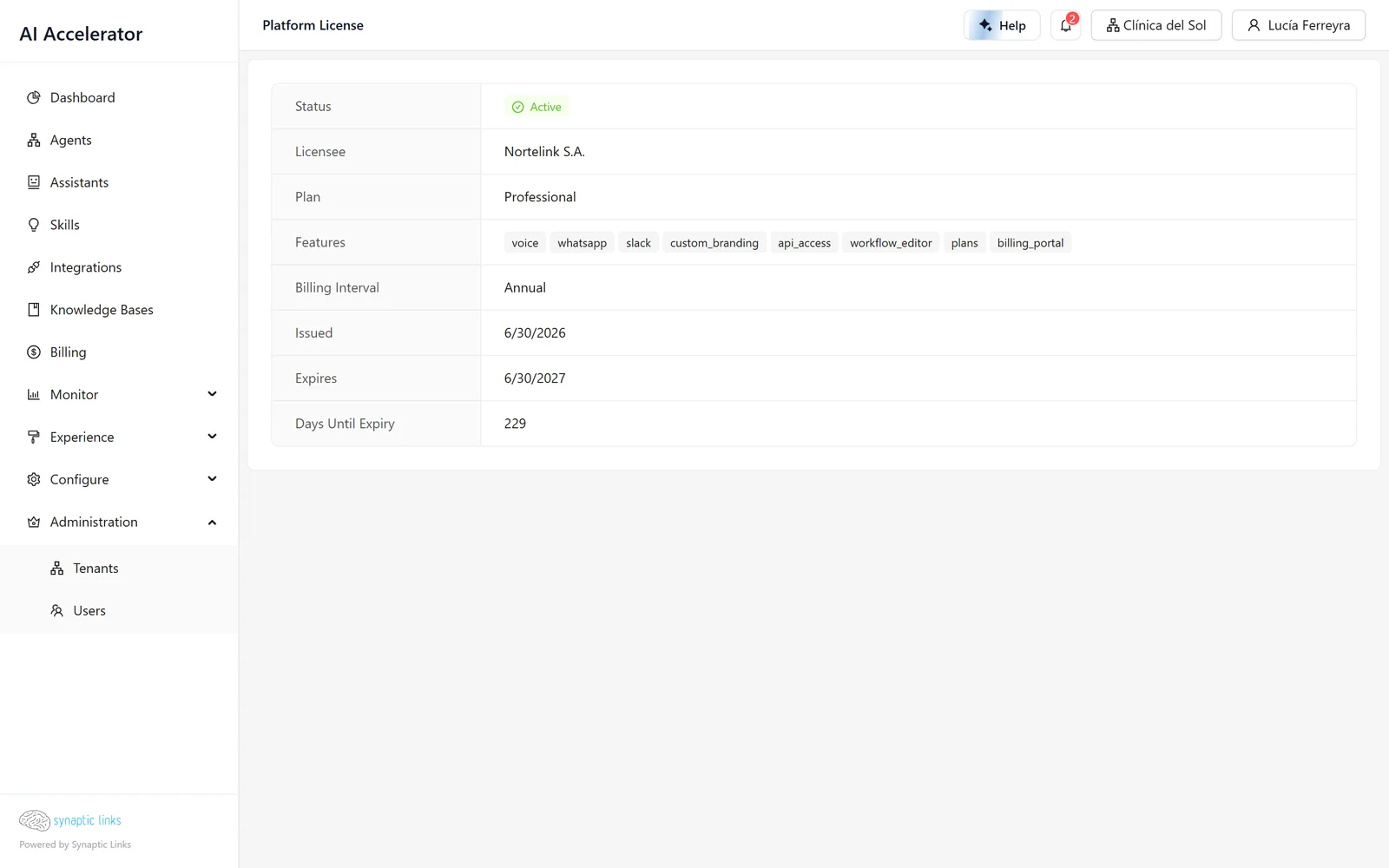
Downloads lists the products your organisation can download. Downloads always come from the vendor's admin: on your own installation that screen shows no published releases.
Email, domains and payments
- Email. The platform sends email through Amazon SES if the region and sender are set in the environment variables; otherwise emails only end up in the logs. The SES identity has to be verified in AWS.
- A single domain. The installation has one domain; additional domains cannot be added.
- Stripe payments. Today they cannot be configured on your own installation: the Stripe key is not among the secrets the installer accepts.
Where it stops
- Almost everything is configured outside the admin: file, AWS secret and identity provider.
- Without a valid licence the platform does not work. There is no degraded mode.
- Renewal needs outbound internet access to the vendor, and today it does not replace the licence in the secret: update it before it expires.
- The licence screen does not show the grace period: the status tag stays empty.
- Database migrations are not reversed when rolling back.
- One domain per installation, without Stripe payments.
- If the installation's state file is lost, the installer cannot upgrade.
To check
- You signed in yourself before publishing the admin's address.
customer.jsonandcustomer.json.installed.jsonare backed up outside the installation machine.- There is a database backup before every upgrade.
- The installation has outbound internet access to the vendor to renew the licence.
- Someone checks the License screen, has the expiry date noted and updates the secret before it.
- The SES identity is verified and test emails arrive.