The clinic's agent has to answer what the opening hours of the downtown branch are, which health insurance plans are accepted, or what preparation an ultrasound requires. That information is not in the model: it is in the clinic's documents. This chapter follows one of those documents from upload until the agent uses it to answer, and explains the decisions you make along the way.
Before uploading anything: the embedding model
A knowledge base does not store documents as they are: it splits them into chunks and stores, for each one, a vector that represents its meaning. That vector is computed by the model of the tenant's embedding tier (chapter 2). There is no default value to replace it: if the tenant does not have the embedding tier configured, nothing can be imported, reindexed or synchronized, and the platform says so with an explicit error.
That is why the knowledge base screen shows whether embedding is available and which model will be used. It is the first thing worth checking.
What happens to a document
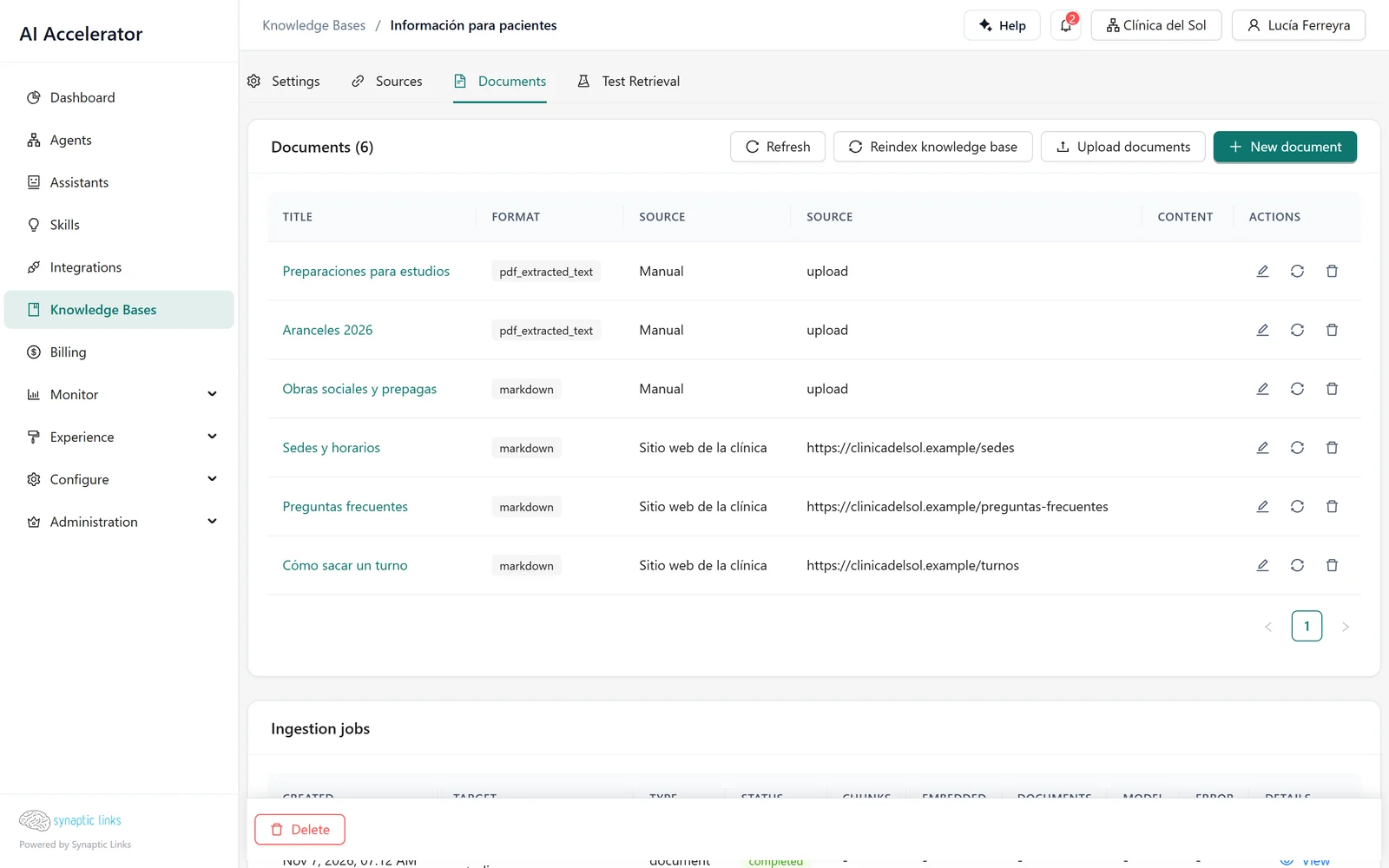
Nortelink uploads preparaciones-estudios.pdf, a 12-page PDF, to the Información para pacientes knowledge base.
- Validation. The platform checks that the tenant has embeddings configured and that the file fits within the storage quota. It accepts plain text, Markdown, PDF, Word, CSV and HTML, up to 20 MB per file and 50 files per upload.
- Reading. The PDF is read page by page. Each chunk that comes from a page remembers its page number, which later appears as a reference.
- Chunking. Each page is split into chunks of about 1,000 characters with 200 characters of overlap between one chunk and the next. The overlap prevents a sentence from being cut exactly between two chunks and not appearing whole in either.
- Vectorization. Each chunk goes through the embedding model and is stored with its vector in the vector store, tagged with the tenant and the knowledge base.
- Queue. All of this runs as a background job. The documents screen shows the status of each job: queued, processing, completed or failed.
Choosing how it is chunked
Chunk size is a decision with consequences. Small chunks find specific answers precisely, but lose context. Large chunks keep the context, but mix topics and dilute the match.
Each knowledge base has a chunking strategy:
- Basic. A fixed size and overlap for everything, both configurable (the size between 100 and 10,000 characters).
- Adaptive. The platform chooses based on the type of content:
| Content type | Size | Overlap |
|---|---|---|
| FAQ | 500 | 50 |
| Technical | 1,000 | 200 |
| Narrative | 1,500 | 300 |
| Tables | 2,000 | 0 |
For the clinic, which mixes FAQs with instructions, the adaptive strategy avoids having to split the documents into two knowledge bases.
Sources: knowledge that updates itself
Uploading files by hand is fine to get started. For information that changes, a knowledge base can have sources that synchronize on their own:
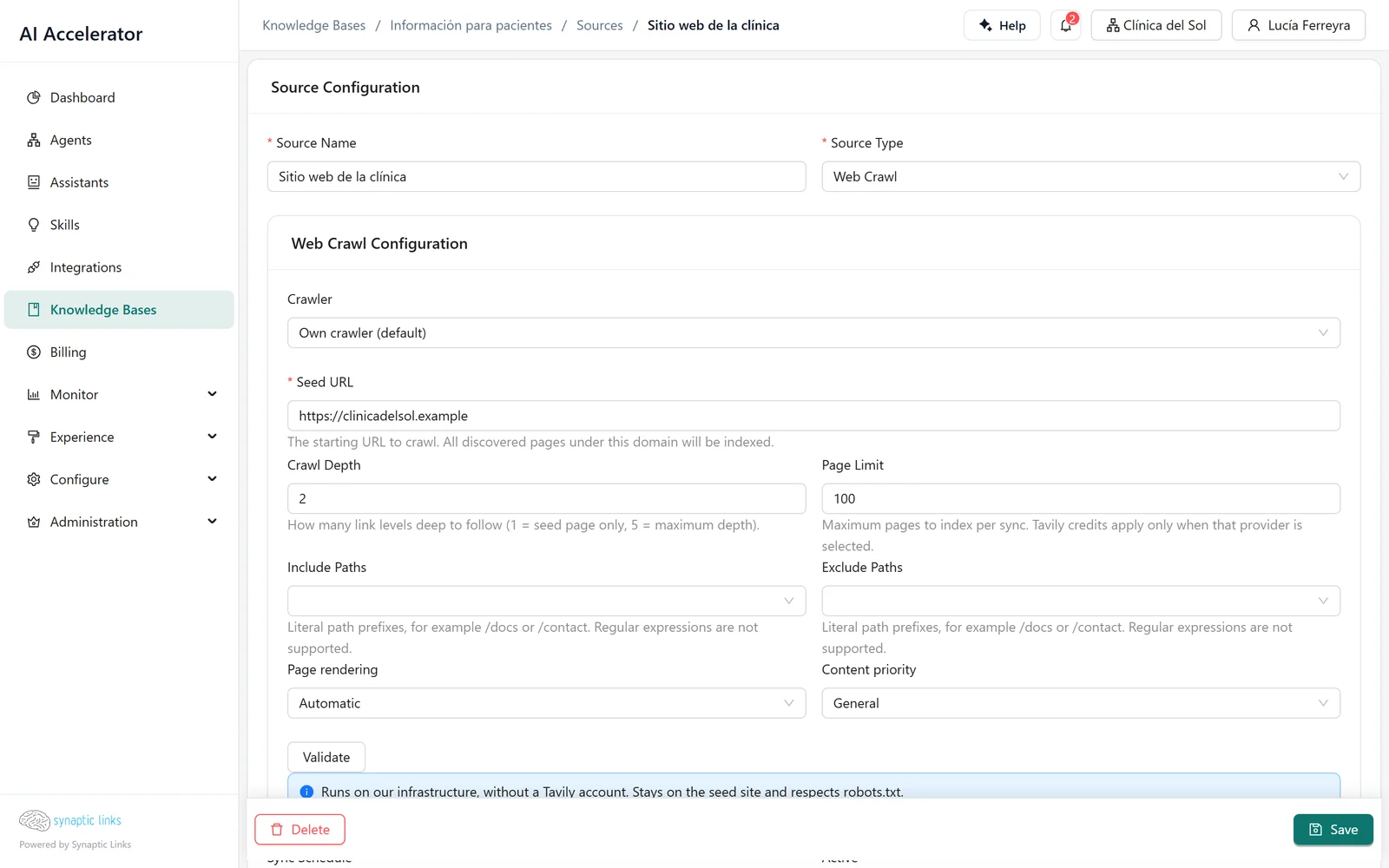
- Website. Crawls a site starting from a URL, up to 5 levels deep and 500 pages (100 by default), without leaving the original site.
- Confluence. Uses the tenant's Confluence integration.
- Google Drive and Amazon S3.
Each source has a frequency: manual, hourly, every 6 or 12 hours, daily or weekly. On each synchronization the platform compares every document with its previous version and decides whether to create, update or delete it; what has not changed is not processed again. If a synchronization is already in progress, another one cannot be started. The synchronization history shows what changed in each run.
The clinic connected its website as a daily source. When it publishes a change to its opening hours, by the next day the agent already answers with the new hours.
How the agent uses it
Knowledge reaches the agent in two ways.
With a search node. The node searches the knowledge bases assigned to it (only those) and passes the chunks to the next step. It returns 5 results by default, 10 at most. It has two strategies:
- Direct. Searches with the message exactly as it arrived.
- Smart. Before searching, a model rewrites the question using the conversation summary and the latest messages, and then picks varied results so that it does not return five chunks that say the same thing.
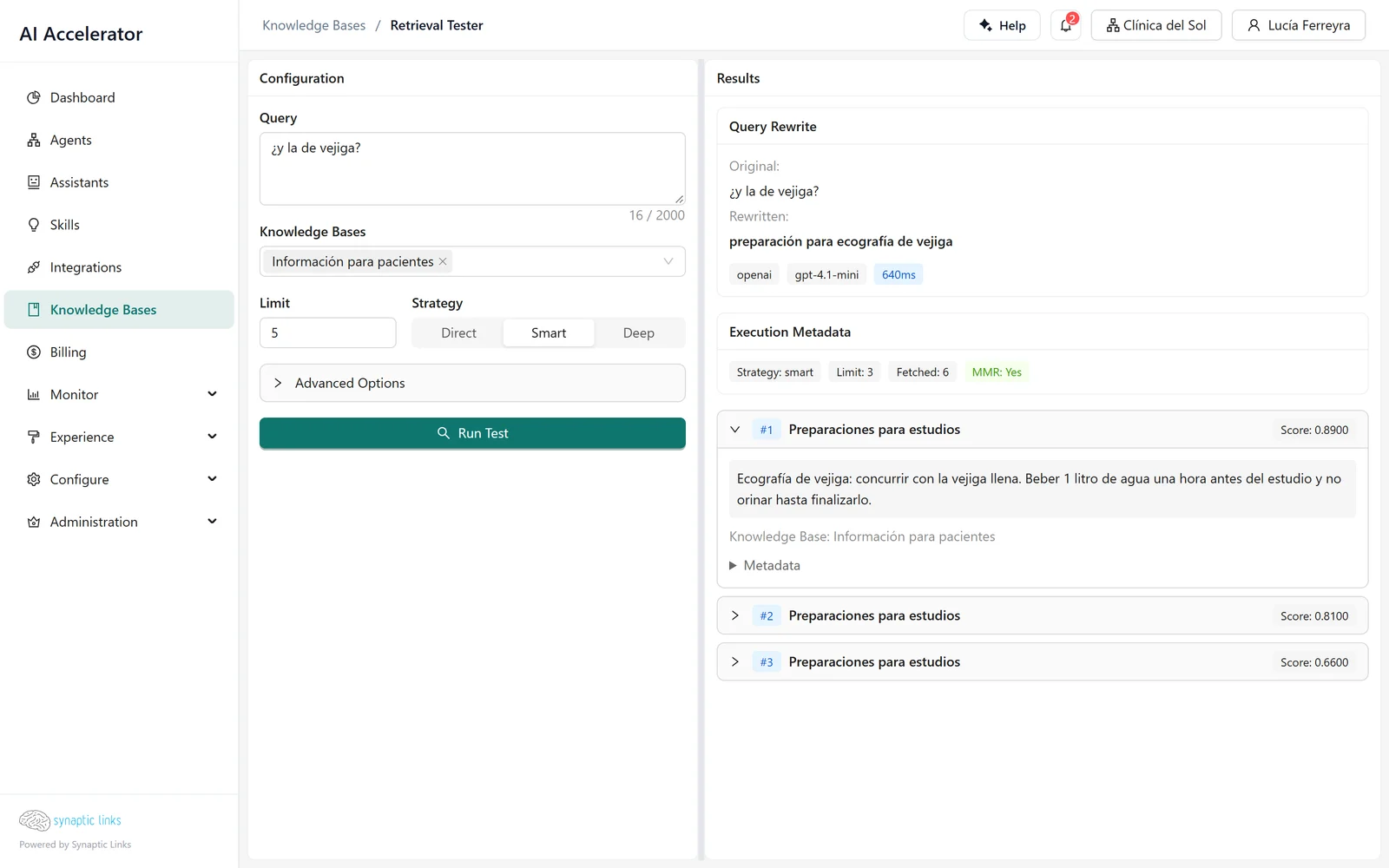
An example shows the difference. A patient first asks "¿qué preparación lleva la ecografía abdominal?" (what preparation does an abdominal ultrasound require?) and then writes "¿y la de vejiga?" (and the bladder one?). Searched as is, "¿y la de vejiga?" finds nothing useful. The smart strategy rewrites it as "preparación para ecografía de vejiga" (preparation for a bladder ultrasound) and finds the right chunk.
You can also set a minimum score: chunks with a similarity below that threshold are discarded. With the default value, 0, none are discarded.
As a tool of the router. If the agent uses a tool router, each assigned knowledge base becomes a search tool that the model decides when to use. Each search returns 5 results.
Test before blaming the model
When an agent answers badly a question that "is in the documents", the problem is almost always that the search did not return the right chunk, not that the model misinterpreted it. The Retrieval Tester lets you check this without going through the agent: you type the query, choose knowledge bases, strategy and number of results, and you see exactly which chunks come back, with their score, the source document and, if you used the smart strategy, the rewritten query.
If the right chunk does not appear, the fix is in the knowledge base (the chunk size, the document, the source), not in the agent's instructions.
Changing the embedding model
Vectors from two different models are not comparable. If you change the model of the embedding tier, the platform queues the reindexing of the tenant's knowledge bases; until it finishes, searches compare vectors from different models and the results are not reliable. It is best to make that change outside business hours.
Where it stops
- Up to 10 results per search.
- Without an embedding model configured, there is no ingestion. There is no default model.
- Files up to 20 MB, 50 per upload. Scanned PDFs without text are not read: there is no optical character recognition.
- Semantic deduplication of nearly identical chunks depends on the installation's vector store and is not available in all of them. Deduplication of identical content on reindexing always works.
- Notion is not available as a source.
- A knowledge base is not implicitly shared with child tenants: it has to be assigned as a default knowledge base (chapter 1).
To check
- The tenant has the
embeddingtier configured before the first knowledge base is created. - For each frequent user question, the Retrieval Tester returns the right chunk among the first results.
- The knowledge bases that feed a search node are the right ones: the node only searches the ones assigned to it.
- Sources have a frequency that matches how often the information changes, and their last synchronization has no error.
- The PDFs you uploaded have selectable text.