An agent does not have "a model". Each step of a workflow asks the platform for a model for a task, and the platform decides which one to use with rules you configure once per tenant. Understanding those rules is what lets you change provider without touching the agents, control cost and know exactly what will happen on the day a provider goes down.
A connection is a credential and a list of allowed models
A connection represents an account with a provider. It stores the provider, the credential, optionally a base URL, the list of enabled models and, if you want, a custom price per model.
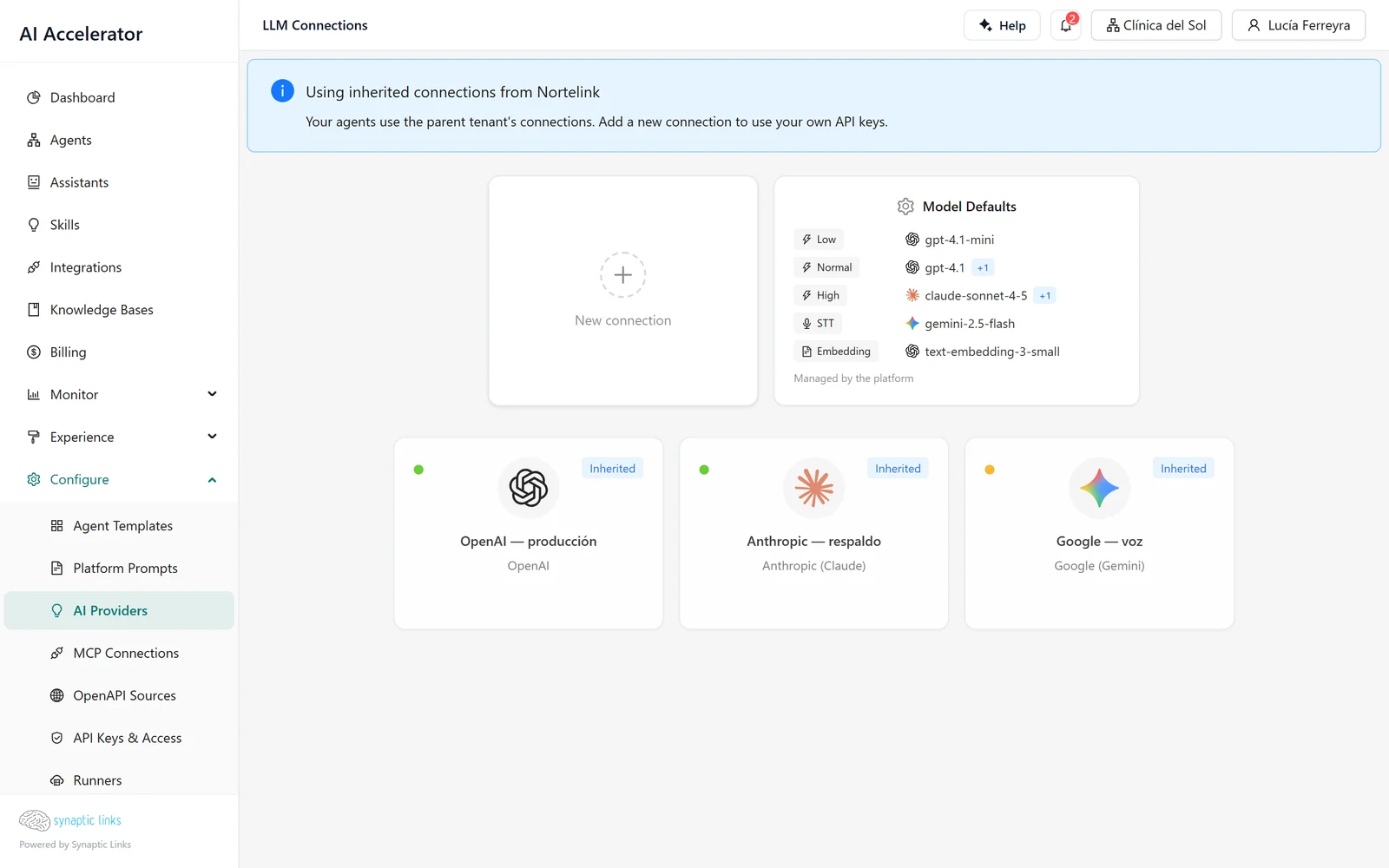
The editor offers OpenAI, Anthropic, Google, DeepSeek, Deepgram and any OpenAI-compatible provider (vLLM, Ollama, Azure OpenAI, OpenRouter and similar). For the known providers the platform fills in by itself how the credential goes into the request: you only paste the key.
When you save, three things happen:
- The key leaves the connection record. It is encrypted and stored separately, and the connection keeps only a reference. What comes back to the admin says "a secret is configured", never the key.
- The platform tests the key against the provider. If it fails, the connection is saved anyway, but comes back with a warning. This way you can load a connection before you have the final key, and you do not lose the rest of the form because of a typo.
- The enabled models become an allowlist. Every call to the provider is checked against that list at the moment it is made. If the list is empty, any model is allowed.
This is what the credential looks like before and after saving:
what you enter     →  apiKey: "sk-proj-…"
what is stored     →  valueSource: { kind: "secret_ref", secretRef: "sec_9f2c…" }
what you see later →  secret configured ✓
Creating connections requires the tenant to have the bring your own key feature enabled. Without it, the tenant uses the connections it inherits.
Reasoning levels separate the agent from the model
If every node of every agent named a specific model, changing provider would mean editing every agent. That is why the platform works with levels: the node says what kind of task it is, and the tenant defines which model handles each kind.
| Level | What it is used for |
|---|---|
low | Simple, cheap tasks: classifying, extracting a piece of data |
normal | Everyday conversation |
high | Long or delicate reasoning |
decision | Routing decisions inside the workflow |
voice | Speech recognition: widget dictation and Asterisk calls |
tts | Text to speech in Asterisk calls |
embedding | Indexing and searching knowledge bases |
image_generation | Generating images |
Each level has a primary model and up to three alternatives in order. On save, the platform validates each entry: that the connection is visible to the tenant and active, that the model is among the enabled ones and that it has the capability the level needs. It will not let you put a model without embedding support in embedding.
For embedding there is an additional rule: the alternatives must use the same model as the primary, even if through another connection. Vectors from two different models are not comparable, so a fallback to another model would return meaningless results. And if you change the embedding model, the platform queues the reindexing of the knowledge bases by itself.
How the runtime picks the model for a step
When a step needs a model, the runtime resolves it in this order:
- If the node has an explicit model, it uses that.
- If not, it uses the chain for the node's level. An unknown level falls back to
normal. - If nothing is configured, it degrades: the node's connection, if it has one; if not, the
normallevel; if not, the first active connection with its first enabled model.
Step 3 exists so that a newly created tenant works without configuring anything. In production it is best not to depend on it: if the model that answers depends on the order in which connections were created, the agent's behaviour changes when someone adds one.
What happens when a provider fails
Each combination of connection and model has its own circuit breaker: a counter that watches the error rate over a rolling 60-second window.
- With at least 5 calls in the window and 50 % or more errors, the circuit opens: that combination stops receiving traffic.
- After 30 seconds it moves to half-open and lets test calls through. If they succeed, it closes.
- Each call has a maximum time of 45 seconds.
- Between "healthy" and "open" there is a degraded state that is shown in the admin as a warning, but does not cut traffic.
When the primary's circuit is open, the next request is handled by the first available alternative for the level, and a failover event is recorded with which model replaced which and why.
Back to the clinic. Its normal level points to gpt-4.1 through the OpenAI connection, with Claude as the alternative:
- OpenAI starts returning errors. In one minute, 4 out of 7 calls fail.
- The circuit for OpenAI +
gpt-4.1opens. - The next conversation from a patient is answered by Claude. In Monitor → Failover History the event appears with the reason "circuit open".
- After 30 seconds the platform tries OpenAI again. If it responds, traffic returns.
- If Claude were also down, the conversation fails with an explicit "all alternatives unavailable" error.
The underlying rule is that failover only walks the chain you configured. The platform never picks a model you did not put there on its own. A clear error is preferable to the clinic's agent answering with a model nobody evaluated.
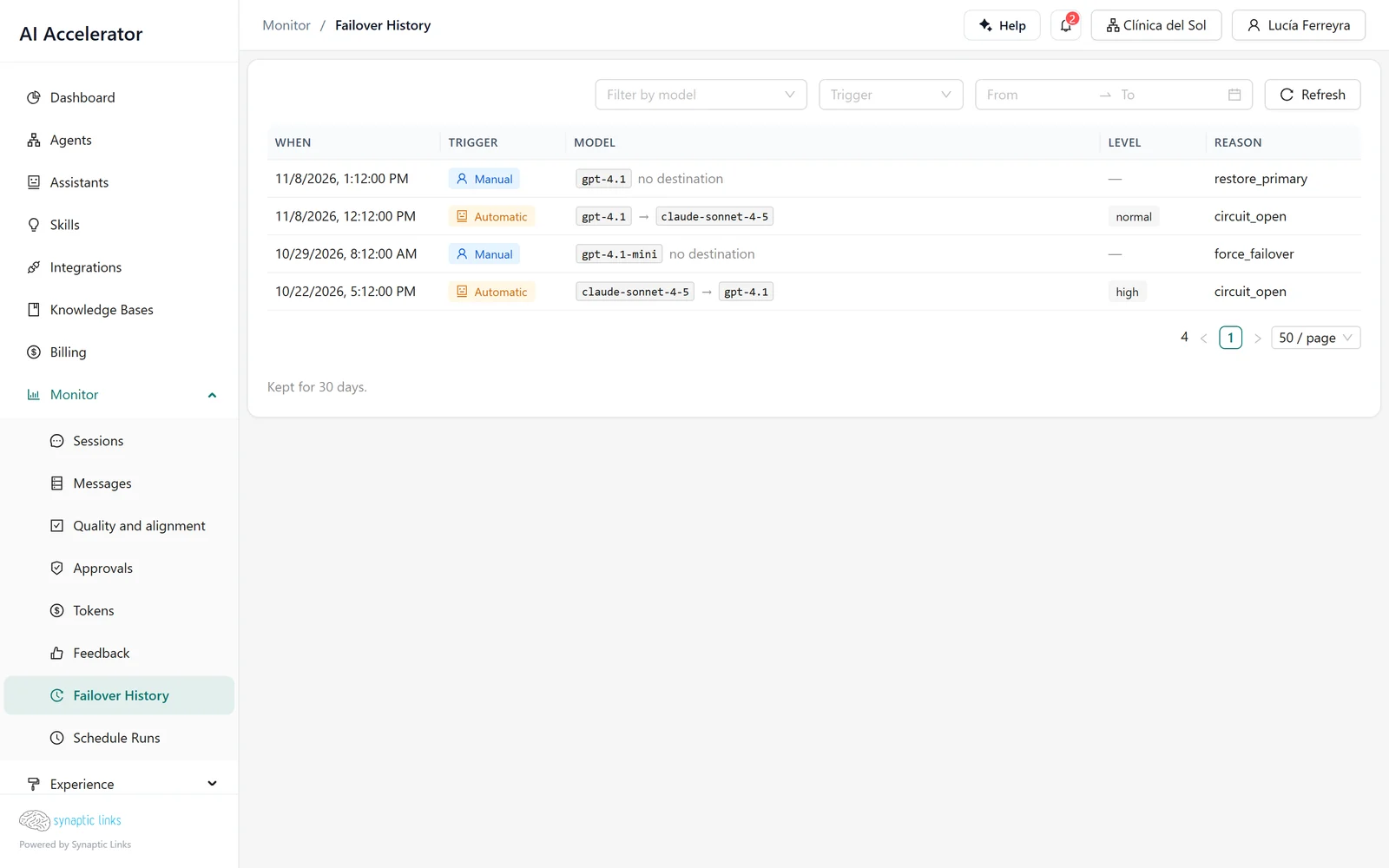
From the admin you can also force failover on a connection (for example, during an incident announced by the provider) and restore the primary when it is over. Both actions are audited in the same history.
Inheritance: the child uses the parent's until it has its own
Clínica del Sol has no connections of its own. It has inheritance turned on, so it uses Nortelink's, and the providers screen shows this with a notice indicating which tenant they come from.
The day someone at the clinic creates their own connection, for example to try a new model, inheritance is cut off entirely: the clinic's agents see only that connection. If the clinic's default levels pointed to Nortelink connections, those levels no longer resolve. The platform does not mix own and inherited connections, precisely so that there is no ambiguity about who pays for each call.
If a tenant has no connections of its own, does not have inheritance turned on or no ancestor has connections, its agents fail with an error that says which of those cases it is.
Deleting a connection
You cannot delete a connection that any agent uses: the platform rejects it and tells you there are references. If it is referenced only by the default levels, those references are cleared first. Deleting it also purges its failover events.
Where it stops
- The circuit breaker parameters are fixed. The thresholds above (5 calls, 50 %, 30 s, 45 s) are the same for all tenants and cannot be adjusted from the admin.
- Each runtime instance keeps its own circuit. With several instances, each one detects the failure on its own; there may be a few seconds where one has already failed over and another has not yet.
- Forced failover does not survive a restart of the runtime: after a restart, the circuit returns to its natural state.
- Up to three alternatives per level.
- Automatic model discovery works with the main providers. For OpenAI-compatible providers that do not publish their list, models are entered by hand.
- Health status appears as "unknown" if the admin cannot query the runtime within 5 seconds. It does not mean the connection is down.
To check
- Every level your agents use in production has a primary and at least one alternative from another provider.
- The
embeddingalternatives use the same model as the primary. - Connections have their list of enabled models filled in. An empty list allows any model, including the most expensive ones.
- If a client inherits models, it has no forgotten connections of its own.
- If you entered custom prices per model, they match your contract with the provider: they are what the platform uses to calculate the cost of each call.