Chapter 8 introduced a tenant's three billing modes, and chapter 7 the cut-offs for balance and limits. This chapter follows the money: when a conversation costs something, whose balance it comes out of, how it is topped up and what changes when moving from one plan to another.
When a run costs something
A run only produces a charge when it uses an inherited model connection: one configured by an ancestor, for example the agency, and used by the tenant. If the tenant loaded its own provider key (chapter 2), the provider bills it directly and the platform neither debits anything nor checks the balance.
So in the typical case, Clínica del Sol has no keys of its own: it uses Nortelink's connections, and every answer from the scheduling agent has a cost someone has to pay.
Who pays
The platform looks for the payer by walking up the tenant tree from the one that consumed:
- If the tenant is in unlimited mode and has a parent, it moves to the parent.
- It repeats until it finds a tenant that is not unlimited, or reaches the root.
- That tenant pays.
| Clínica del Sol | Nortelink | Who pays |
|---|---|---|
| Unlimited (the mode it is created with) | Prepaid | Nortelink, from its balance |
| Prepaid | Prepaid | Clínica del Sol, from its balance. Nortelink's is not touched |
| Postpaid | Any | Clínica del Sol, on account |
A single balance is debited per run: the payer's. There is no split between the agency and the platform.
How much is charged
The amount comes from the payer's configuration:
- If it has a custom price per model (per million tokens), that is used.
- Otherwise, the provider's real cost multiplied by its pricing multiplier. The multiplier is inherited from ancestors and, if nobody sets it, is 1.
The debit happens once per run, after all steps finish. If the debit fails, the answer still reaches the user.
Custom prices and the multiplier are set by a super admin, in each tenant's billing. An agency does not set its clients' prices from its own account.
What the client sees: the Billing screen
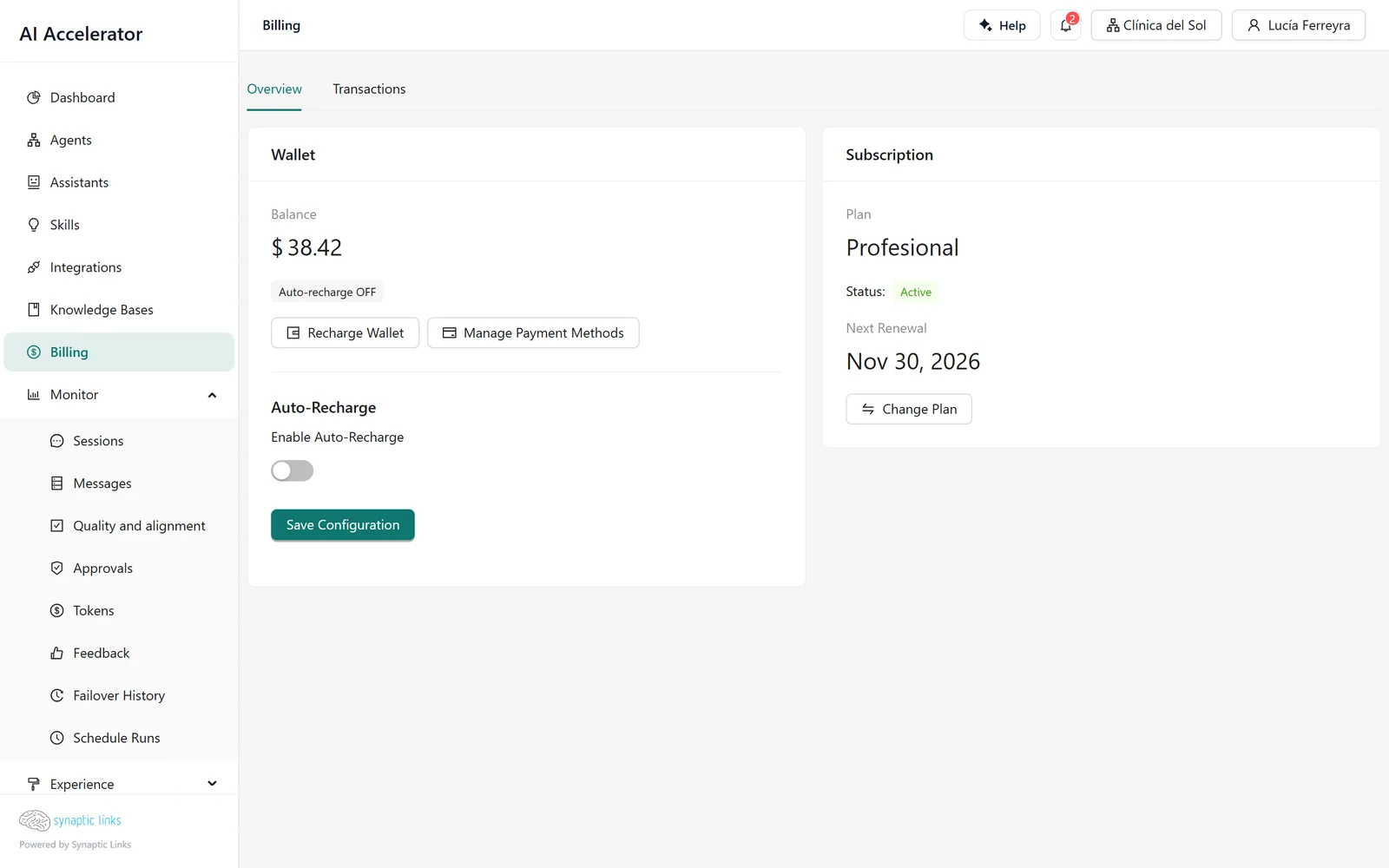
With self-service billing enabled, the menu shows Billing, with two tabs:
- Overview: the Wallet, with the balance, auto-recharge and the buttons to top up and manage payment methods; and the Subscription, with the plan, its status, the next renewal and the button to change plan.
- Transactions: top-ups, adjustments, usage debits and cycle resets.
Topping up
Recharge Wallet offers fixed amounts in dollars —5, 10, 25, 50, 100, 250 or 500, unless the installation changes them— and opens the payment in Stripe. On returning, the screen shows "We are confirming your top-up" until the confirmation arrives.
The balance is credited only when Stripe confirms the payment, not when the user returns to the screen. The same purchase cannot be credited twice.
Manage Payment Methods opens Stripe's customer portal, which is where cards and invoices live. The platform does not issue its own invoices.
When the balance reaches zero
A prepaid tenant needs a balance above zero for a run to start. Without balance:
- The end user reads: "The assistant is currently unavailable."
- The tenant's admin sees a notice: Your assistant is paused because your balance has run out, with a top-up button.
- The balance-depleted alert is raised (chapter 7).
As soon as a top-up is credited, the agent answers again; nothing has to be reactivated.
Plans
A plan packages a monthly or annual price with what the tenant gets while it has it:
- Initial balance, added to the balance once when the plan is assigned.
- Included balance per cycle, applied at each renewal.
- Limits, features, per-minute limits and billing mode, which replace the tenant's own when the plan is assigned.
Plans are created and assigned by a super admin. A tenant sees its own plans and those of its ancestors, and can buy the ones that are public, have a Stripe price for the chosen interval and are enabled for it.
Changing plan
Change Plan can be used by the tenant's owner and admins. What happens depends on the direction:
- Upgrading: applied immediately. Stripe charges the prorated difference and the tenant gets the new plan's limits and features at once.
- Downgrading: scheduled for the end of the period. The screen shows the pending change and the tenant keeps the current plan until then.
- Without a Stripe subscription: upgrading goes through Stripe payment; downgrading is applied directly.
Promotion codes are accepted, and an amount preview is shown before confirming.
Renewal resets the balance
When Stripe charges the renewal of a plan with an included balance, the balance is set to that amount; it is not added. Whatever was left from the previous cycle, top-ups included, is lost. If a client tops up mid-cycle, it is worth telling them that the top-up expires at renewal.
Who can do what
| Action | Who |
|---|---|
| View billing and transactions | Any user of the tenant |
| Top up | Any user who sees the Billing screen |
| Buy or change plan | Owner or admin, with plans enabled |
| Billing mode, multiplier, prices, balance adjustments | Super admin |
| Create and assign plans | Super admin |
The self-service billing and plans features are enabled per tenant and also depend on the installation's licence. Stripe is configured once for the whole installation: an agency does not connect its own Stripe account.
Where it stops
- Stripe only and dollars only. There are no other payment methods or currencies.
- Auto-recharge does not work yet. The screen lets you set an amount and a threshold, but the platform does not store the payment method it needs to charge on its own, so it never fires. Until that is fixed, the balance is topped up by hand.
- The hard and soft limits do not cut anything, even though the screen says they block the service. The real cut-offs are the balance and the monthly consumption limits (chapter 7).
- A plan's included messages are informational. To limit messages, use the consumption limits.
- An overdue or cancelled subscription does not cut the service: the runtime does not look at the subscription, only at the balance and limits.
- The agency does not see the usage detail of an unlimited client in its own transactions, even though it is paying for it.
- A plan change can unlink the Stripe subscription. After an upgrade, a second change may take the "without subscription" path. Before a second change, check the subscription in Stripe.
- There is no margin split between the platform and the agency: the multiplier is the only markup.
To check
- Each client has the right mode: if it is unlimited, the agency pays.
- Prepaid tenants have a low-balance threshold with room to top up by hand.
- Monthly consumption limits are set wherever a real cap is needed.
- Clients with a plan know that renewal resets the balance.
- Public plans have a Stripe price for each interval offered.