A language model remembers nothing between one call and the next. Everything the agent "knows" on a turn is what the platform puts in front of it at that moment: part of the conversation, a summary of what came before, some data stored about the person, the context sent by the page where the widget lives. This chapter explains where each of those pieces comes from, when they are lost and what each one controls.
What is loaded before the first step
When a message arrives, before running any node, the platform prepares:
- The memory owner. If the person is signed in, it is their identity. If not, it is an identity derived from the channel: the WhatsApp number, the Slack user, or the widget visitor's private identifier. That owner decides which long-term memories belong to them.
- The session summary, if there is one, and the messages after that summary. If there is no summary yet, all the messages in the session.
- The agent's static data (see below).
- The context sent by the channel: in the widget, what the host page attaches to the conversation, such as the patient who is viewing their appointment or the location they chose.
With that assembled, the workflow runs. The nodes decide which of all that reaches the model.
The context node and compaction
The Conversation context node, usually the first one in the workflow, gathers those pieces, passes them through the personal data guardrails (chapter 9) and makes them available to the following steps.
Along the way it does something important: it compacts. If the summary plus the messages exceed about 12,000 tokens, it summarizes the oldest messages and keeps the last eight verbatim. What it never does is drop messages that are not covered by a summary: if it cannot summarize safely, it prefers to keep everything and records that it postponed compaction. That is why the limit is a target, not a hard cap.
The node's "recent messages" field does not trim the history; it is informational. What really limits the size is compaction.
What the model sees at each step
Something being loaded does not mean the model sees it. Each step that calls the model (an AI task, a tool router) has a context selector that decides which sections to include:
| Section | What it brings |
|---|---|
| Conversation summary | What happened before the recent messages |
| Recent messages | The messages not yet summarized |
| Long-term memory | The memories stored about this person |
| Included context | What the page or the channel sent |
| User message | The current message |
| Frontend instructions | Instructions added by the host page |
| Current date and time | So the model knows what day it is |
By default, steps include the summary, recent messages, user message, included context, frontend instructions and date. Long-term memory is not in the default selector: if we enable it on the context node, we also have to add it to the selector of the step that answers. It is the most common cause of "I configured memory and the agent does not remember".
Summaries: memory within a session
The Conversation summarizer node maintains the session summary. It fires when there are more unsummarized messages than the threshold (eight by default), by message count or by token budget. It summarizes incrementally: it takes the previous summary and the new stretch, and produces an updated one that keeps identifiers and concrete data.
If the model call fails, it keeps the previous summary and saves nothing, so as not to replace a good summary with an empty one.
The summary belongs to the session and the agent version. Two consequences:
- A new session starts without a summary. Remember that on messaging channels a session closes after 24 hours of silence (chapter 6).
- If we activate a new version of the agent, ongoing sessions do not find their summary and are recompacted from the messages.
Long-term memory: what survives the session
For the clinic's agent to remember that a patient is allergic to penicillin when they come back three days later, long-term memory is needed.
Reading, on the context node:
- None (the default).
- Per person: the memories of this memory owner.
- Per entity: the memories associated with the entity sent by the page (a patient, an invoice, a customer), even if another person generated them.
It brings at most five memories, ordered by priority and date. There is no search by meaning: if there are many, the highest-priority and most recent ones win.
Writing, with the Memory writer node: after the answer, a model extracts up to three facts from the conversation and stores them as records. There are two modes:
- Manual step: stores only what the model extracted.
- Automatic extraction: if the model extracted nothing, it still stores a record with the exchange, trimmed.
A fact identical to an existing one updates the record instead of duplicating it. Memories belong to each agent: the appointments agent does not see what the front-desk assistant stored. They are deleted after 365 days without updates, when the agent is deleted or when the tenant is deleted.
This is how the patient case looks:
- Day 1, signed in: the patient mentions their allergy. The writer stores
Alérgico a la penicilinafor that person. - Day 4, new session, same person: there is no summary or history from the previous session, but the context node brings the memory, and the step that answers sees it because its selector includes long-term memory.
- The agent remembers the allergy, but not what was discussed on day 1.
If the patient writes from the widget without signing in and the page does not send a private visitor identifier, the memory owner is derived from the session, and in a new session there is nothing to remember.
Static data: what the workflow always knows
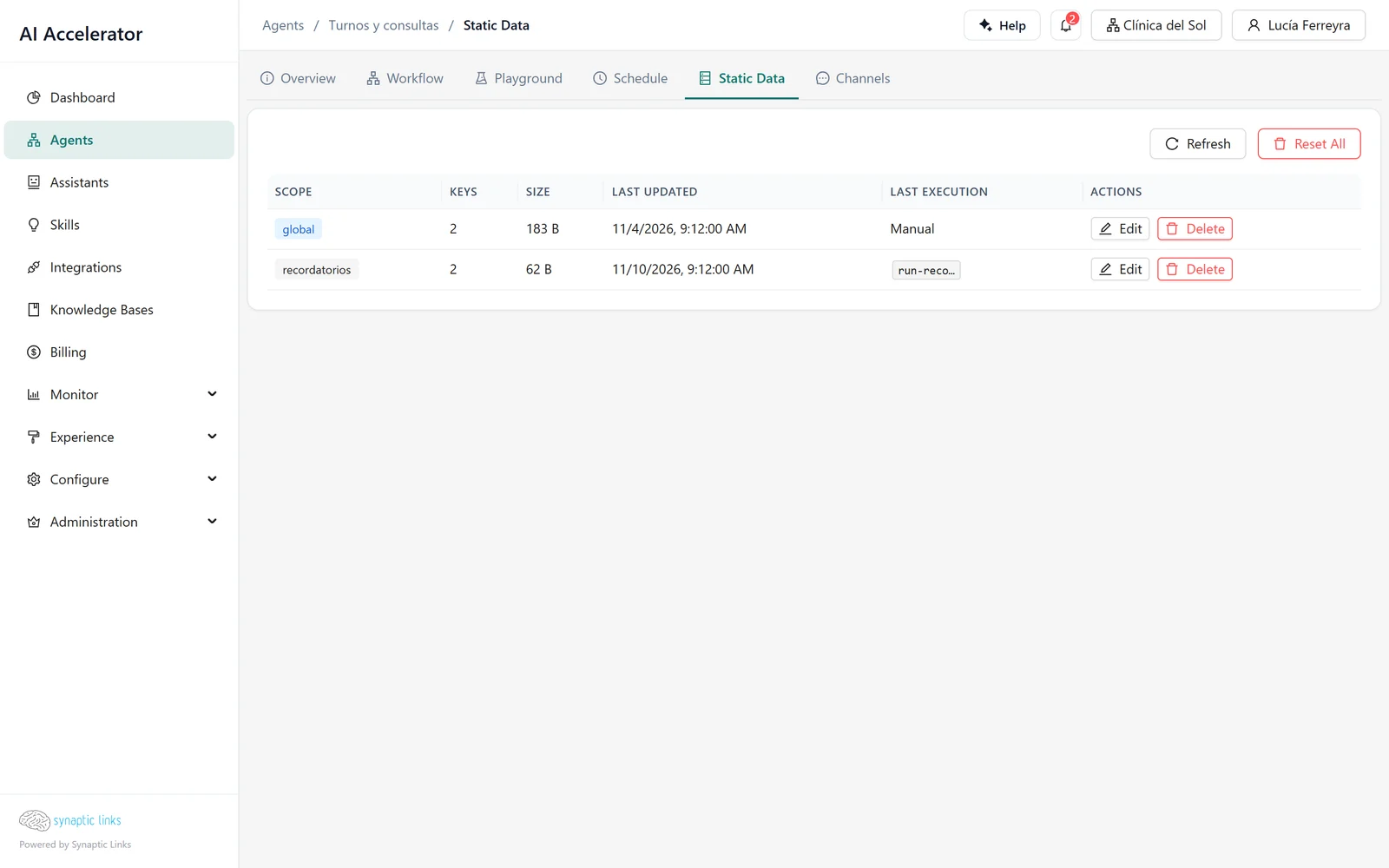
Each agent's Static Data tab stores JSON data by scope (for example, the list of locations with their opening hours, or counters the workflow itself updates), up to 64 KB per scope.
During a run they are read-only for conditions and nodes (state.* in expressions), and a code node can return updates, which are saved when the run finishes if it was not cancelled.
The important part: static data does not reach the model on its own. For the model to see the locations, a node has to copy them into a workflow variable or include them in its output.
Platform prompts: the tone of the internal pieces
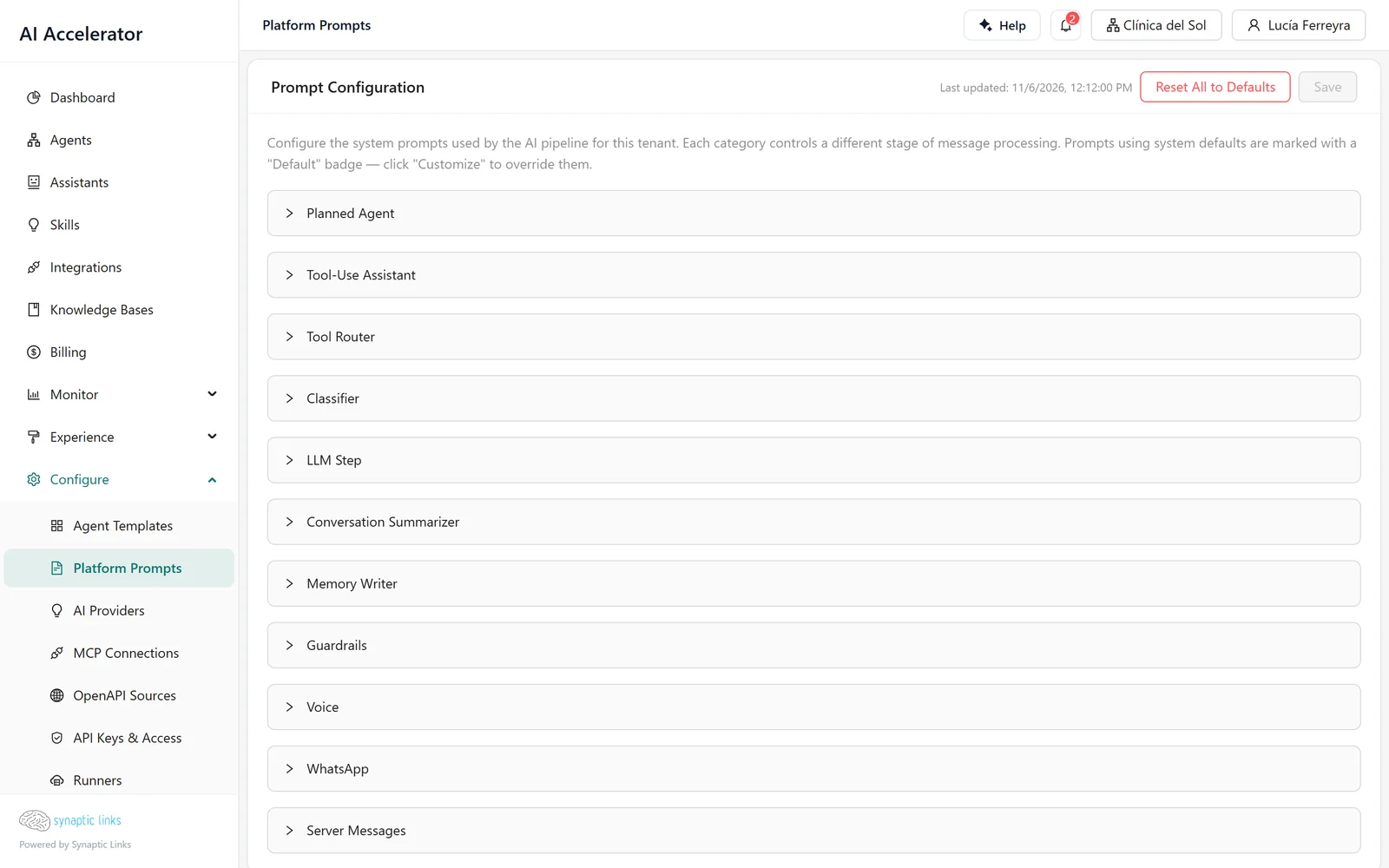
Several pieces of the platform use their own instructions: the tool router, the classifier, the summarizer, the memory writer, the guardrails, the voice and WhatsApp messages, the server messages. Those instructions are the platform prompts, and they can be adjusted per tenant in Configure → Platform Prompts.
The order of precedence is: the factory defaults, the installation values, the system tenant values and, finally, the tenant values. The last one to define each key wins. There is no per-agent level, except the memory writer's own template on each node.
A typical case: the clinic wants summaries to always keep the practitioner's name and the appointment date. That rule is added to the summarizer prompt in its tenant, and it applies to all of its agents.
The prompts used by the assistant compiler are fixed at compile time. If we change them, existing assistants need to be recompiled to pick them up; the screen offers to do it.
Variables and page context
A workflow can declare variables. Each one takes its value, in order, from what a Set State node wrote, from the context the page sent under that name, or from its default value. That way, the patient portal page can send paciente_id and sede, and the agent uses them without asking for them.
Where it stops
- Long-term memory is per agent. There is no shared memory between the agents of a tenant.
- It has to be added to the selector of the step that answers: the default selector does not include it.
- The summary does not survive a new session or a new version of the agent.
- Reading memories does not search by meaning: it brings the highest-priority and most recent ones, five by default.
- Contradictory facts accumulate: only identical ones are merged.
- There is no screen to view or delete a person's memories; they are deleted with the agent, with the tenant or through inactivity.
- Static data does not reach the model unless a node copies it, and it is limited to 64 KB per scope.
To check
- If the agent must remember across sessions: memory reading enabled on the context node, a memory writer in the workflow and long-term memory in the selector of the step that answers.
- People are identified: signed in, or a private visitor identifier in the widget.
- The static data the model needs goes through a variable.
- Changes to platform prompts were tested in the playground before applying them to all of the tenant's agents.
- After changing compiler prompts, the assistants were recompiled.