Answering questions is half of the clinic's work. The other half is doing things: checking the schedule, booking an appointment, creating a ticket. For that the agent uses tools, and each tool is an operation of an external system that the platform offers to the model with a name, a description and the data it needs. This chapter explains where those tools come from, how they reach the agent and what happens on each call.
Three ways to connect a system
All tools come from one of these sources:
- OpenAPI source. An API that publishes its OpenAPI specification. Each operation in the specification is a possible tool.
- MCP connection. A server that speaks the MCP protocol and publishes its own list of tools.
- Webhook. An HTTP call you define by hand: URL, method, parameters. It is for your own endpoint that has no specification.
In addition, there are A2A connections with agents on other platforms, which the agent can use as if they were just another tool.
The catalog: integrating without writing code
For the most common systems there is no need to build anything by hand. The Integrations section shows a catalog of more than thirty integrations grouped by category: productivity (Google Workspace, Microsoft 365, Atlassian, GitHub, Calendly), finance (Stripe, PayPal, QuickBooks), CRM (HubSpot, Zendesk), commerce (Shopify), channels (Slack, Teams, Twilio, Meta), observability (Langfuse), security and automation.
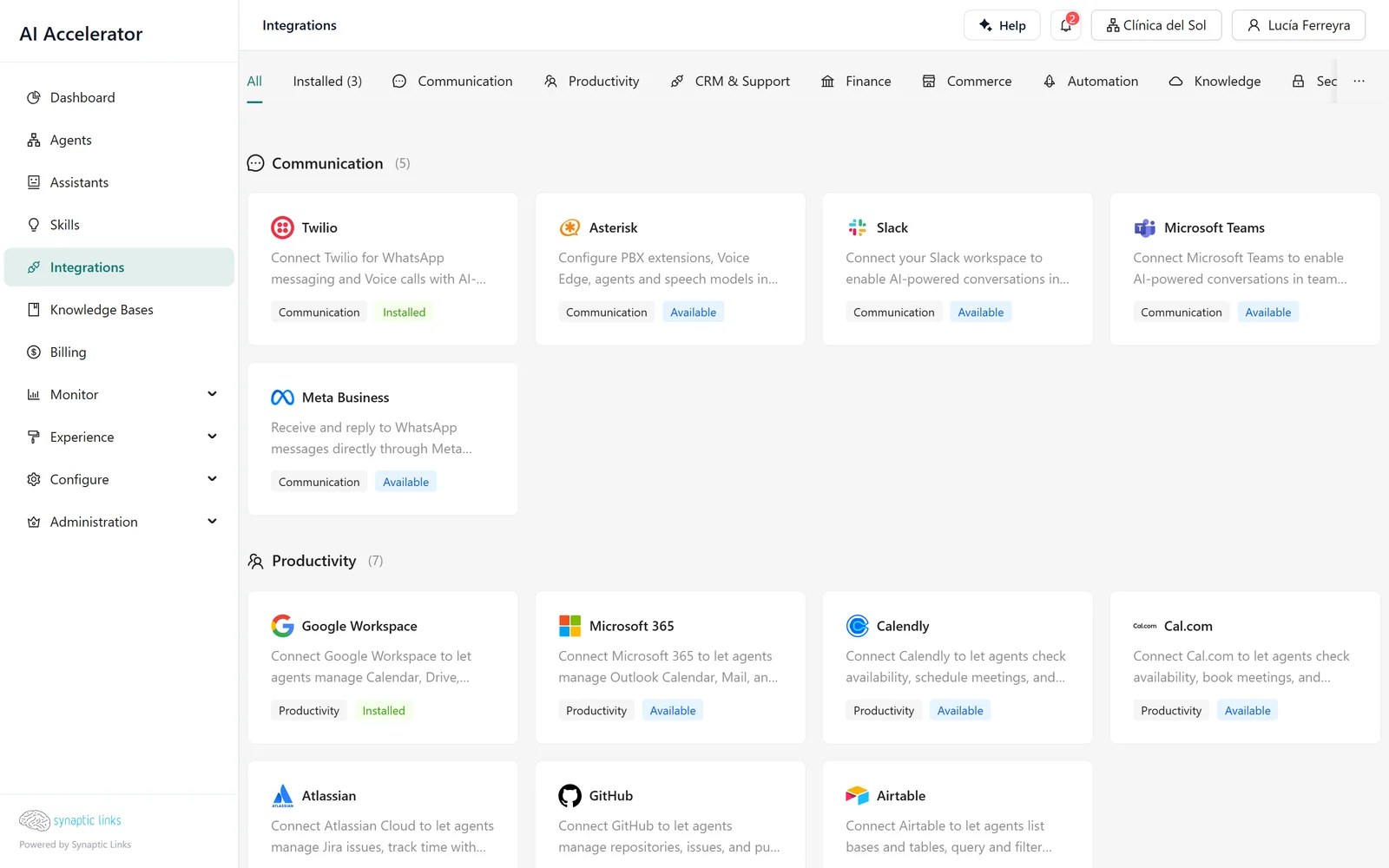
Each catalog entry is a declarative description: what type of authentication it uses, what data it asks for, how the connection is tested and what resource it generates. Adding an integration to the catalog means adding an entry, not writing code. The consequence for you is that all integrations are installed the same way:
- Install. You enter the data it asks for: a key, a domain, an OAuth consent. The platform seals the secrets and leaves the integration in the Setup Incomplete state.
- Connect. The platform tests the connection and generates the corresponding resource: an OpenAPI source, an MCP connection or an A2A connection. The integration becomes Connected.
With Stripe, for example: you install it with your key, and on connect the platform creates an OpenAPI source with Stripe's operations, tests the key by querying the balance and marks the most useful operations as recommended, such as listing customers or invoices.
From source to agent tool
The fact that a source exists in the tenant does not mean the agent uses it. Each agent declares which sources it can use and, within each one, which operations. That selection matters for two reasons:
- Security. The Stripe API has hundreds of operations, including refunds and deletions. The clinic's agent needs none of those.
- Quality. The more tools the model sees, the worse it chooses. The platform limits each node to 50 tools and does not let you save a node that exceeds that without filtering operations.
At run time, the tool the model sees carries the name of the source and of the operation, for example Agenda_Clinica__ListarTurnosDisponibles. The parameters you fixed (a branch identifier, an account) are removed from what the model sees: the model cannot change them because it does not even know they exist.
What happens on each call
When the model decides to use a tool, the platform:
- Checks access again. That the tenant has permission for that source and that operation, at that moment, not when the agent was saved.
- Resolves the credential. It looks it up in the secret store, renewing the OAuth token if it expires within the next minute.
- Makes the call with a maximum time of 30 seconds.
- Records the invocation: which tool, with what data, what it returned and how long it took. This is what you see in the detail of each execution (chapter 7).
For MCP connections there is also a network control: the platform refuses to connect to internal addresses, so that a misconfigured MCP server cannot serve as a door into the installation's private network.
Credentials never travel with the agent
Each secret (a key, an OAuth token) is encrypted and stored separately, and resources only store a reference. Encryption binds each secret to its owner: a secret sealed for one tenant's integration cannot be decrypted as if it belonged to another, even if someone copies the encrypted value.
A credential can also come from the user who is chatting, instead of being fixed for the tenant: the page hosting the agent sends that person's token, and the call is made with their permissions and not with an account that sees everything. That is configured on a source of your own. Catalog integrations such as Google Workspace or Microsoft 365 use a single account connected by the tenant (Connect Google Workspace and Microsoft 365).
Tools shared with customers
An agency can share tools from its own tenant with its child tenants, operation by operation. The operation available to the child is the one that is enabled in the source, granted by the parent and selected in the agent, all three at the same time. If the parent withdraws permission for an operation, the child's agent stops seeing it on the next execution.
Generating documents
The catalog's Document Generation integration needs no credentials: it connects a platform server that gives the agent tools to generate PDF and Word documents from templates —report, proposal, document, contract, CV— with predefined styles. The usual way to use it is to activate the catalog's PDF generation skill and assign it to the assistant: the skill provides the content and the integration takes care of the design.
The agent returns a download link that expires after an hour. The source document is kept for 30 days by default and, meanwhile, you can ask the agent for a revision —"change only the price"—, which produces a new version. It does not support logos or custom fonts, and it does not email or sign the documents.
Outbound notifications: letting other systems know
The reverse path also exists. A tenant can register outbound webhooks to find out what happens on the platform: conversations started, negative feedback, low balance, among other events. Each notification:
- carries only identifiers, never the content of the conversation;
- is signed with a secret specific to the endpoint, so the receiver can verify that it comes from the platform;
- is retried if it fails, with increasing waits from one minute to one day, and is abandoned after eight attempts.
An endpoint that fails for three days in a row is disabled automatically, as is one that responds that it no longer exists. Only public HTTPS URLs are accepted, up to 10 per tenant, and the secret is shown only once, when it is created.
Where it stops
- 50 tools per node. Large APIs need an operation filter.
- Human approval is per node, not per tool. There is no "ask for confirmation before calling this operation" flag; for that, you place an approval gate before the step (chapter 3).
- Tool webhooks are created by hand. No catalog entry generates one.
- Outbound notifications cover account, conversations, quality and billing. There are no agent or tool events.
To check
- Each agent has the operations of large APIs filtered and sees no delete or refund operation it does not need.
- The tenant's integrations are Connected, not Setup Incomplete.
- Operations with real effects are behind an approval gate.
- The tools shared with customers are only the ones the customer needs.
- Outbound webhook receivers verify the signature and discard notifications older than five minutes.