Wenui has one promise: paste your website, meet your assistant. A business owner types their address, and a short while later is talking to an assistant that already knows their opening hours, their prices and how to reach them. If they like it, they confirm their email, top up a prepaid balance and paste one snippet into their site. There is no subscription and no sales call.
Behind that promise every customer gets a complete, configured setup: their own tenant, their own knowledge base, their own agent, a credential for their own site, a balance, a sign-in and a portal. Nobody configures any of it by hand. Wenui is a product with its own brand, site and commercial rules, built on AI Agent Builder as one of the platform's clients — and the work of turning one setup into many configured clients is the platform's.
This piece follows the path a web agent takes from a pasted URL to a widget on a customer's site, what Wenui builds itself, what it takes from the platform, and how each new client arrives already configured. It is the long version of an idea from why every client should be a tenant of its own: a tenant can be a customer's account, and it can also be a whole product with customers of its own.
What the product builds and what the platform provides
The split is the first design decision and everything else follows from it. Wenui builds everything a visitor sees and every rule that belongs to its business. The platform provides everything that would be the same for any product that runs agents for many clients.
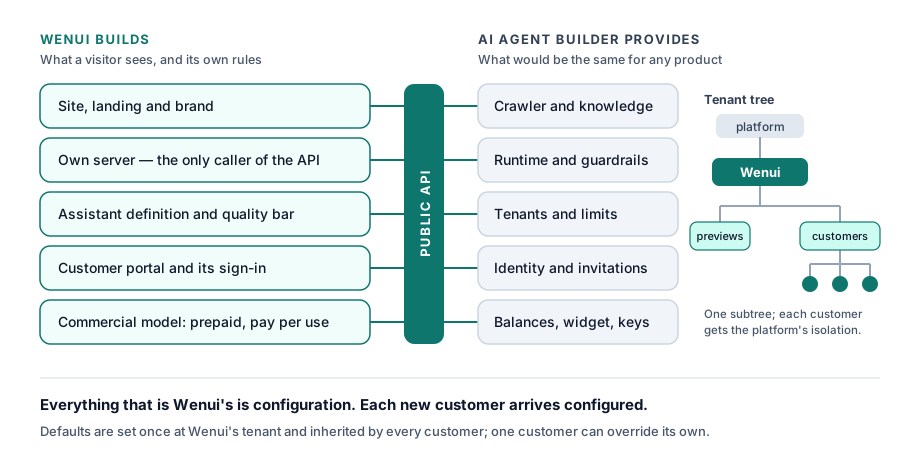
| Wenui builds | AI Agent Builder provides |
|---|---|
| The site, the landing and the brand | The crawler that reads a website |
| Its own server, which talks to the platform | Knowledge bases, retrieval and the agent runtime |
| The assistant's definition: tone, rules, model choice | Guardrails, run records and model resilience |
| The quality bar a website has to clear | Tenants, limits and settings inherited down the tree |
| The customer portal and its sign-in flow | Identity, invitations and access per tenant |
| Its commercial model: prepaid, pay per use | Balances, top-ups and per-use metering |
| Its own assistant that sells Wenui on wenui.ai | The embeddable widget and its credentials |
Wenui's server talks to the platform through its public API with a credential for its own part of the tenant tree — the same calls any company building a product would make. That is what makes the left column small: a product team writes what is unique to its product and configures the rest.
One tenant tree, many configured clients
Everything Wenui does happens inside one subtree. At the top sits Wenui's own tenant. Under it hangs a tenant for previews — the assistants built for visitors who have not signed up — and one child tenant per paying customer.
That shape is where most of the configuration lives. A customer's knowledge base, agent, keys, balance and users sit in their own tenant, so every Wenui customer gets the same isolation the platform gives any tenant from the first minute. Previews live apart from customers, so anonymous traffic and paying customers never share a space.
Settings resolve nearest-first up the tree. Wenui writes a value once at its own tenant — a limit, a rate, a destination for invitations — and every customer underneath inherits it. When one customer needs something different, the value is written on that customer and only that customer changes. A product with a thousand clients has one place to set the defaults and one place per client for the exceptions.
Billing follows the same walk. A tenant that does not set its own rate is charged the nearest ancestor's, so a product sets its margin once at the top and every new client is created already priced.
From a URL to an agent in about half a minute
The preview is the product's whole sales argument, so it is the part most worth getting right.
- The address is checked first. Only public web addresses, no credentials, nothing that resolves to a private network.
- The platform reads the site. Wenui asks for a web source on a new knowledge base and the platform's crawler does the rest: it honours robots rules, follows sitemaps, pins the public DNS answer to the socket it connects to, renders the page in an isolated browser when the plain HTML turns out to be an empty shell, and keeps business facts — a published phone number, an address, opening hours — as content. Every chunk keeps the URL of the page it came from.
- Wenui applies its own quality bar. A site with too little text is turned away and its knowledge base removed. That threshold is a Wenui rule, so it lives in Wenui.
- Wenui creates its own agent. The definition is Wenui's: a guardrail for injection and jailbreak attempts that blocks the turn if the checker is unavailable — the input is public and anonymous — a fast model for answering, a short tone guide, and an instruction to offer the business's contact details when the site does not have the answer.
- The visitor chats. Wenui's server relays each turn with a session tied to that visitor and that preview, caps it at a dozen messages and streams the answer back as it is written.
In our measurements on the shared crawler, a 25-page site goes from address to answering agent in about 35 seconds. Two hours later the preview's agent and knowledge base are cleaned up.
A fully configured client in one sequence
When the visitor confirms their email, Wenui provisions a customer. Each step is an ordinary call, and each one is safe to repeat:
- A child tenant under Wenui's, created — or reused if a previous attempt got halfway — and inheriting everything set above it.
- A prepaid balance, starting at zero, ready for the first top-up.
- The knowledge the visitor already approved. The preview's snapshot is copied into a new web source in the customer's tenant; the platform checks that the source, the knowledge base and the tenant belong together and computes the hashes that later syncs compare against. The next sync builds on those documents, so the site is read once.
- The agent, from the same definition the preview used.
- A public key made for one job. It belongs to one tenant, carries a read-only role, works only on the web chat channel and only for that agent. Wenui stores it encrypted, so a retry hands back the same key.
- An invitation for the owner, which creates the identity and lets the owner choose a password or link an existing sign-in.
If creating the documents or the agent fails, the new knowledge base is rolled back and the sequence can run again from the top. Every client comes out of it the same way, which is what lets a product grow without a person in the onboarding.
Its own front door
A product needs its own address, and its customers should feel they are in that product from the first screen to the last.
The console on Wenui's own domain. The platform serves its admin console on an additional hostname configured for one tenant subtree. On that hostname every request is scoped to that subtree: users see their own tenants, requests for anything outside it are refused, and public endpoints without a recognisable tenant stay closed. The hostname carries the product's display name, and each tenant's own branding can sit on top.
Its own sign-in. Wenui runs its own client against the shared identity pool, with its own managed login branding — Wenui's colours, Wenui's logo — and exact callbacks to Wenui's own domains. The platform accepts tokens from that additional client for the same issuer. Same identities, same permissions per tenant, the product's own front door.
Invitations that come home. When the platform sends an invitation, it needs to know where the person should set up their account. Destinations are deployment configuration, keyed by tenant, and an invitation resolves to the nearest ancestor that has one. A Wenui customer's invitation lands on Wenui's setup page because that customer hangs under Wenui's tenant. The next product configures its own entry and gets the same behaviour.
A portal that is the product. Most customers never need the admin console. Wenui's portal signs them in with the authorization code flow and PKCE through its own server, shows the tenants where they are an owner, and gives them three things: the finished snippet with their key in it, their balance and a top-up button. The console stays available for anyone who wants to fine-tune their agent.
Pay per use, ready-made
Wenui sells pay-per-use with a prepaid balance, and the money handling comes with the platform.
The top-up opens the payment provider's checkout from the customer's own session. When the payment is confirmed, the platform's webhook credits the balance once per checkout, under a lock on that balance, including payment methods that settle later. The portal then asks the platform whether that checkout was credited, so the confirmation the customer sees is about their purchase. The runtime checks the tenant's balance before it answers, so the first message after the credit goes through on its own.
Configuration, not code
Everything that is Wenui's lives in Wenui or in configuration: its hostname, its login client, its callbacks and its invitation destination are entries in the deployment, and its tone, rules and quality bar are in its own server. The platform's code is the same code every installation runs.
That is deliberate, and it pays twice. Wenui moves at its own pace, because changing the product never waits on a platform release. And each time Wenui needed something new — destinations for invitations, a second login client, a console on its own domain — it was built as a generic capability that any tenant can configure. The next company that builds a product on the platform starts with all three already there.
What is configured by hand today
- Additional domains are set up by an operator: one reviewed configuration change per domain, with its certificate and acceptance. There is no self-service screen for it yet.
- The payment page shows the merchant identity of the account that collects, rather than the product's.
- The top-up amounts are one list for the installation. Per-tenant lists are requested.
- The sign-in page is served from the platform's authentication domain, with each client's own branding.
Seven properties of a platform you can build a product on
Whether you build on this platform or another, these are the properties that decide how fast a product with many clients can grow — one point each.
- Your product runs on public, versioned APIs, so your team writes product and not integration workarounds.
- Each of your customers gets the platform's own isolation boundary from the moment they are created.
- You set a value once for all your customers — a rate, a limit, a destination — and override it for one when needed.
- You can issue a credential that does exactly one thing, for one agent, on one channel.
- Your product lives on its own domain and its own sign-in, so customers stay inside your brand.
- Payments confirm themselves through the platform, once per purchase, ready for your portal to show.
- What your product needs arrives as configuration, and every capability built for one product is there for the next.