Your twenty-first client should cost you what your second one did.
That is not a claim about how fast anyone types. It is a claim about the shape of the work: if setting up a client means assembling the same system again with different names on it, the twenty-first costs more than the second, because by then you are also maintaining the twenty before it.
We argued that the gap between a ten-minute onboarding and a three-day one is almost never labour — it is waiting on people. Here is what closing that gap looks like in AI Agent Builder, from the seat of whoever is doing it.
The client is a workspace under yours
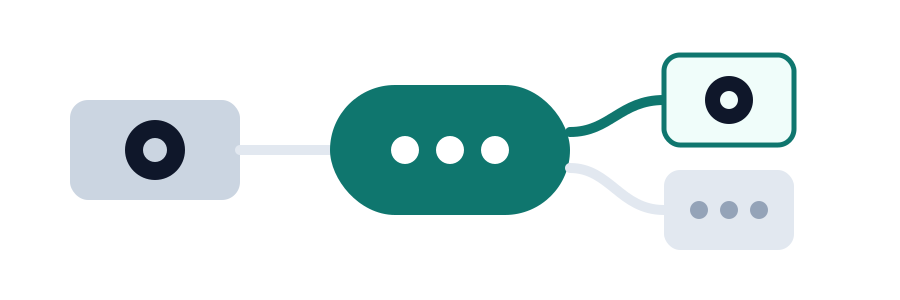
You do not create a second installation, and you do not create an account the client signs up for. You create a workspace that hangs underneath yours, and that position is what does the work.
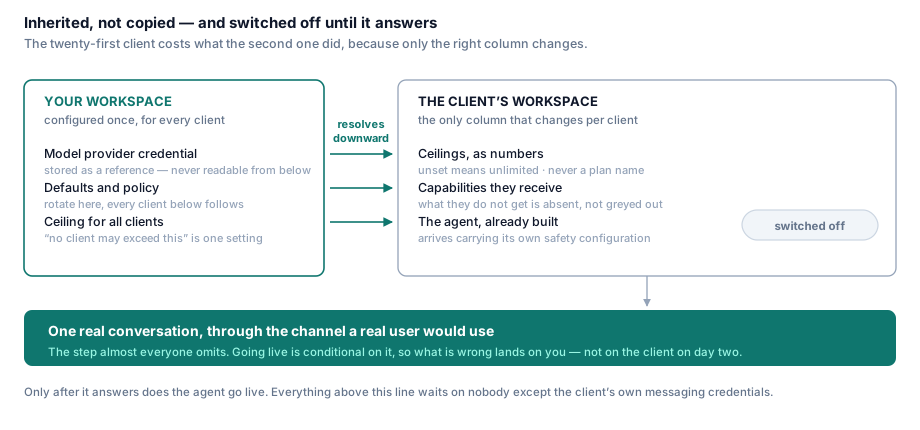
Everything you have already configured — your model provider, your defaults, your policy — resolves downward. The client's workspace does not get a copy of any of it.
That distinction is the one to hold on to, because it is invisible on day one and decisive in month six. A copy is a thing you now maintain in twenty places: rotate your provider key and you rotate it twenty times, and each of those twenty copies is readable by whoever runs that client's workspace. Inheritance is one change at the top that every client below picks up, and a credential none of them can read.
The platform stores your provider credential as a reference, not as a value that gets handed down. Your client's team operates their agent all day and never holds your key. When you rotate it, you rotate it once.
What they are allowed to consume, before they consume it
Two families of ceiling, and you set both now rather than after the first surprise.
Resource ceilings — how many agents, how many users, how much storage, whether they may create workspaces of their own. Reaching one refuses the action with a clear message; it does not degrade anything already running.
Consumption ceilings — messages per cycle, a hard spend limit, and a soft threshold below it. The soft one is the field people leave empty and later wish they had not: it is the difference between a warning on a Tuesday and a client whose agent stopped answering.
Two properties of this are worth knowing before you price anything.
Ceilings are numbers, not a plan. Nothing in enforcement reads a plan name. That is why you can give one client a temporary exception without inventing a commercial tier for them, and why moving a client between commercial arrangements does not require re-configuring what their agent may do.
Unset means unlimited. A workspace you create without touching this is uncapped. That default is deliberate: a limits system whose failure mode is blocking existing clients gets switched off within a quarter, so restriction is something you opt into, per client, on purpose.
Ceilings also resolve down the hierarchy. Set one on your own workspace and every client underneath inherits it, which means the sentence "no client of ours may exceed this" is one setting rather than a policy you re-apply forty times.
Turn off what this client does not get
The same screen decides which channels exist for them, and whether they can open the workflow editor at all.
That last one is the interesting choice for a managed client, and it is a commercial decision more than a technical one: they receive a working agent, and they do not receive the ability to rewrite it. Their team gets the conversations, the history and the knowledge base; the behaviour stays yours. For a client who wants to own the logic you flip it the other way, and nothing else about the setup changes.
Capabilities they never see do not clutter their interface. There is no greyed-out upsell furniture in a client's workspace advertising what they did not buy.
The agent arrives finished
You do not build the agent again. You bring in the one you already built — its workflow, its knowledge sources, its tool bindings and, importantly, its safety configuration — and then override the handful of things that are genuinely per-client: the display name, the greeting, the branding, which knowledge base it reads.
The safety configuration travelling with the agent rather than being applied afterwards matters more than it sounds. Configured per client after the fact, protection ends up thorough for the clients you were paying attention to and thin for the rest — and which clients those are is decided by how busy you happened to be that week. Ship it in the definition and let the exception be the exception.
The agent comes in switched off. It exists, it is fully configured, and it is answering nobody. That is deliberate and it is the whole point of the next two sections.
The one step that waits on someone
If the client wants their agent on their own messaging number, that number's credentials come from them, on their schedule, usually by email.
This is the only genuinely external dependency in the entire setup, and the trick is not to make it faster — you cannot — but to move it. Ask for it when the contract is signed, not when you reach this screen. The waiting does not disappear; it stops being in the middle, which is where three days come from.
Everything else here waits on nobody.
Their administrator, invited
You create the client's own administrator and the platform sends them an invitation.
An invitation, not a password. You should not know, transmit or store your client's credential, and any process that generates one has created a secret that now lives in somebody's inbox. Their administrator sets their own, and their access is scoped to their own workspace — they can run their agent and they cannot see any other client, which is the answer their auditor is going to ask for in writing.
The test that decides whether it goes live
Before the agent is switched on, send it a real message through the channel a real user would use, and read the reply.
This is the step almost every onboarding omits, and skipping it is what turns three days into five. Without it you have configured a great deal and confirmed that configuration was accepted — which is not the same as an agent that answers. With it, going live is conditional on a passing conversation, and anything wrong lands on you now instead of on your client on day two.
Only then do you switch it on.
Doing it again is the actual test
The setup above is worth having when the third client's configuration looks like the second's. Below that, you are not onboarding clients — you are delivering projects, and there is nothing to template yet.
Above it, the property that matters is that the twenty-first client is not a new build. Same inherited connections, same ceilings expressed as numbers, same agent definition, same test before go-live. What differs between clients is a short list of values, and that list is short by design.
And a caveat that survives all of this: making a process repeatable encodes it. If your onboarding is wrong today, doing it this way produces a fast, consistent, repeatable version of the wrong thing, forty times, with an audit trail proving you meant it. Get one client right by hand first. Then make that the template.
What to check on your own setup
Take whatever you run today and answer these. They are deliberately unforgiving, because partial credit is what hides the problem.
- Can you set up a complete client without a person making a decision in the middle? Not "mostly" — at all.
- Does the new client inherit your provider credentials, or receive a copy they can read?
- Are their ceilings numbers you can change per client, or a tier you have to invent?
- Does the agent arrive carrying its own safety configuration, or is that applied afterwards, per client, from memory?
- Is there a real test conversation between "configured" and "live"?
- Can the client's administrator see anything belonging to another client? The correct answer is not "we filter that in the interface".
- Could someone who joined last week do it end to end from your documentation?
Six or better and your remaining constraint is genuinely the client's paperwork. Below four, the ten minutes is not a tooling problem — it is that the process still has people standing in it, and every one of them is a queue.